# Xget
**Repository Path**: zsome/Xget
## Basic Information
- **Project Name**: Xget
- **Description**: No description available
- **Primary Language**: Unknown
- **License**: GPL-3.0
- **Default Branch**: main
- **Homepage**: None
- **GVP Project**: No
## Statistics
- **Stars**: 0
- **Forks**: 0
- **Created**: 2025-11-15
- **Last Updated**: 2025-11-15
## Categories & Tags
**Categories**: Uncategorized
**Tags**: None
## README
# 🚀 Xget
[](#-部署)

[](#-生态系统集成)
[](#-生态系统集成)
[](https://zread.ai/xixu-me/Xget)
[](https://deepwiki.com/xixu-me/Xget)

***[English](README.en.md)***
[](#github)
[](#gitlab)
[](#gitea)
[](#codeberg)
[](#sourceforge)
[](#aosp-android-%E5%BC%80%E6%BA%90%E9%A1%B9%E7%9B%AE)
[](#hugging-face-镜像)
[](#civitai-ai-模型平台)
[](#npm-包管理加速)
[](#python-包管理加速)
[](#conda-包管理加速)
[](#maven-包管理加速)
[](#apache-软件下载加速)
[](#gradle-包管理加速)
[](#homebrew-包管理加速)
[](#ruby-包管理加速)
[](#r-包管理加速)
[](#perl-包管理加速)
[](#texlatex-包管理加速)
[](#go-模块加速)
[](#nuget-包管理加速)
[](#rust-包管理加速)
[](#php-包管理加速)
[](#debianubuntu-apt-配置)
[](#debianubuntu-apt-配置)
[](#fedora-dnf-配置)
[](#rocky-linux-dnf-配置)
[](#opensuse-zypper-配置)
[](#arch-linux-pacman-配置)
[](#arxiv-论文下载)
[](#f-droid-存储库镜像)
[](#jenkins-插件下载)
[](#ai-推理提供商)
[](#容器注册表)
面向开发者资源的超高性能、安全、一体化加速引擎,其性能显著优于传统解决方案,为代码存储库、软件包注册表、AI 推理 API、容器镜像、模型、数据集及更多资源提供统一且高效的加速。
技术深度解析文章已发布:**[《深入剖析 Xget:一个高性能、多协议、高安全性的开发者资源加速引擎》](https://blog.xi-xu.me/2025/10/07/deep-dive-into-xget-technology.html)**。
## 💡 存储库初衷
本存储库的初衷是为了加速在中国大陆境内访问不违反相关法律法规的平台上的开发者资源,从而为广大开发者提供一个稳定、合法的加速体验。我们致力于:
- **🌍 消除地理限制**:帮助中国大陆开发者快速访问海外开发者资源
- **⚖️ 合规合法**:严格遵守相关法律法规,仅加速合法的公开资源
- **🚀 提升效率**:显著提高开发者的工作效率和开发体验
- **🆓 普惠开源**:为开源社区贡献力量,促进技术交流与发展
## 🎯 快速使用
**预部署实例(不保证可靠性):`xget.xi-xu.me`**
**URL 转换器:**[**`xuc.xi-xu.me`**](https://xuc.xi-xu.me) - 一键转换任意支持平台的 URL 为 Xget 的加速格式!
## 🌟 核心优势 - 为什么选择 Xget?
### ⚡ 极速性能 - 突破传统加速器瓶颈
- **⚡ 毫秒级响应**:Cloudflare 全球 330+ 边缘节点,平均响应时间 < 50ms
- **🌐 HTTP/3 极速协议**:启用最新 HTTP/3 协议,连接延迟降低 40%,传输速度提升 30%
- **📦 智能多重压缩**:gzip、deflate、brotli 三重压缩算法,传输效率提升 60%
- **🔗 零延迟预连接**:连接预热和保持活跃,消除握手开销,实现秒级响应
- **⚡ 并行分片下载**:完整支持 HTTP Range 请求,多线程下载速度倍增
- **🎯 智能路由优化**:自动选择最优传输路径,避开网络拥堵节点
### 🌐 多平台深度集成
- **一站式多平台支持**:统一支持代码存储库、包管理器、AI 推理提供商、容器注册表、模型与数据集托管平台
- **智能识别与转换**:自动识别平台前缀并转换为目标平台的正确 URL 结构
- **一致的加速体验**:无论文件类型或来源,均可享受统一且稳定的极速下载体验
### 🔒 企业级安全保障
- **多层安全标头**:
- `Strict-Transport-Security`:强制 HTTPS 传输,预防中间人攻击
- `X-Frame-Options: DENY`:防止点击劫持攻击
- `X-XSS-Protection`:内置 XSS 防护机制
- `Content-Security-Policy`:严格的内容安全策略
- `Referrer-Policy`:控制引用信息泄露
- **请求验证机制**:
- HTTP 方法白名单:常规请求限制为 GET/HEAD,Git 操作动态允许 POST
- 路径长度限制:防止超长 URL 攻击(最大 2048 字符)
- 输入清理:防止路径遍历和注入攻击
- **超时保护**:30 秒请求超时,防止资源耗尽和恶意请求
### 🚀 现代架构与可靠性
- **智能重试机制**:
- 最大 3 次重试,线性延迟策略(1000ms × 重试次数)
- 自动错误恢复,提高下载成功率
- 超时检测和中断处理
- **高效缓存策略**:
- 1800 秒(30 分钟)默认缓存时长,显著减少源站压力
- Git 操作跳过缓存,确保实时性
- 基于 Cloudflare Cache API 的边缘缓存
- **性能监控系统**:
- 内置 `PerformanceMonitor` 类,实时追踪请求各阶段耗时
- 通过 `X-Performance-Metrics` 响应头提供详细性能数据
- 支持缓存命中率统计和优化建议
### 🎯 Git 协议完全兼容
- **智能协议检测**:
- 自动识别 Git 特定端点(`/info/refs`、`/git-upload-pack`、`/git-receive-pack`)
- 检测 Git 客户端 User-Agent 模式
- 支持 `service=git-upload-pack` 等查询参数
- **完整操作支持**:
- `git clone`:完整存储库克隆,支持浅克隆和分支指定
- `git push`:代码推送和分支管理
- `git pull/fetch`:增量更新和远程同步
- `git submodule`:子模块递归克隆
- **协议优化**:
- 保持 Git 专用请求头和认证信息
- 智能 User-Agent 处理(默认 `git/2.34.1`)
- 支持 Git LFS 大文件传输
### 📱 生态系统集成
- **专用浏览器扩展**:[Xget Now](https://github.com/xixu-me/Xget-Now) 提供无缝体验
- 自动 URL 重定向,无需手动修改 URL
- 支持自定义 Xget 实例域名
- 多平台偏好设置和黑白名单管理
- 本地处理,确保隐私安全
- **下载工具兼容**:完美支持 wget、cURL、aria2、IDM 等主流下载工具
- **CI/CD 集成**:可直接在 GitHub Actions、GitLab CI 等环境中使用
## 📖 URL 转换规则
使用预部署实例 **`xget.xi-xu.me`** 或你自己部署的实例,只需简单替换域名并添加平台前缀:
### 转换格式
| 平台 | 平台前缀 | 原始 URL 格式 | 加速 URL 格式 |
|------|----------|--------------|--------------|
| GitHub | `gh` | `https://github.com/...` | `https://xget.xi-xu.me/gh/...` |
| GitHub Gist | `gist` | `https://gist.github.com/...` | `https://xget.xi-xu.me/gist/...` |
| GitLab | `gl` | `https://gitlab.com/...` | `https://xget.xi-xu.me/gl/...` |
| Gitea | `gitea` | `https://gitea.com/...` | `https://xget.xi-xu.me/gitea/...` |
| Codeberg | `codeberg` | `https://codeberg.org/...` | `https://xget.xi-xu.me/codeberg/...` |
| SourceForge | `sf` | `https://sourceforge.net/...` | `https://xget.xi-xu.me/sf/...` |
| AOSP | `aosp` | `https://android.googlesource.com/...` | `https://xget.xi-xu.me/aosp/...` |
| Hugging Face | `hf` | `https://huggingface.co/...` | `https://xget.xi-xu.me/hf/...` |
| Civitai | `civitai` | `https://civitai.com/...` | `https://xget.xi-xu.me/civitai/...` |
| npm | `npm` | `https://registry.npmjs.org/...` | `https://xget.xi-xu.me/npm/...` |
| PyPI | `pypi` | `https://pypi.org/...` | `https://xget.xi-xu.me/pypi/...` |
| conda | `conda` | `https://repo.anaconda.com/...` 和 `https://conda.anaconda.org/...` | `https://xget.xi-xu.me/conda/...` 和 `https://xget.xi-xu.me/conda/community/...` |
| Maven | `maven` | `https://repo1.maven.org/...` | `https://xget.xi-xu.me/maven/...` |
| Apache | `apache` | `https://downloads.apache.org/...` | `https://xget.xi-xu.me/apache/...` |
| Gradle | `gradle` | `https://plugins.gradle.org/...` | `https://xget.xi-xu.me/gradle/...` |
| Homebrew | `homebrew` | `https://github.com/Homebrew/...` | `https://xget.xi-xu.me/homebrew/...` |
| RubyGems | `rubygems` | `https://rubygems.org/...` | `https://xget.xi-xu.me/rubygems/...` |
| CRAN | `cran` | `https://cran.r-project.org/...` | `https://xget.xi-xu.me/cran/...` |
| CPAN | `cpan` | `https://www.cpan.org/...` | `https://xget.xi-xu.me/cpan/...` |
| CTAN | `ctan` | `https://tug.ctan.org/...` | `https://xget.xi-xu.me/ctan/...` |
| Go 模块 | `golang` | `https://proxy.golang.org/...` | `https://xget.xi-xu.me/golang/...` |
| NuGet | `nuget` | `https://api.nuget.org/...` | `https://xget.xi-xu.me/nuget/...` |
| Rust Crates | `crates` | `https://crates.io/...` | `https://xget.xi-xu.me/crates/...` |
| Packagist | `packagist` | `https://repo.packagist.org/...` | `https://xget.xi-xu.me/packagist/...` |
| Debian | `debian` | `https://deb.debian.org/...` | `https://xget.xi-xu.me/debian/...` |
| Ubuntu | `ubuntu` | `https://archive.ubuntu.com/...` | `https://xget.xi-xu.me/ubuntu/...` |
| Fedora | `fedora` | `https://dl.fedoraproject.org/...` | `https://xget.xi-xu.me/fedora/...` |
| Rocky Linux | `rocky` | `https://download.rockylinux.org/...` | `https://xget.xi-xu.me/rocky/...` |
| openSUSE | `opensuse` | `https://download.opensuse.org/...` | `https://xget.xi-xu.me/opensuse/...` |
| Arch Linux | `arch` | `https://geo.mirror.pkgbuild.com/...` | `https://xget.xi-xu.me/arch/...` |
| arXiv | `arxiv` | `https://arxiv.org/...` | `https://xget.xi-xu.me/arxiv/...` |
| F-Droid | `fdroid` | `https://f-droid.org/...` | `https://xget.xi-xu.me/fdroid/...` |
| Jenkins 插件 | `jenkins` | `https://updates.jenkins.io/...` | `https://xget.xi-xu.me/jenkins/...` |
| AI 推理提供商 | `ip` | 见 [AI 推理提供商](#ai-推理提供商) | 见 [AI 推理提供商](#ai-推理提供商) |
| 容器注册表 | `cr` | 见[容器注册表](#容器注册表) | 见[容器注册表](#容器注册表) |
### 各平台转换示例
#### GitHub
```url
# 原始 URL
https://github.com/microsoft/vscode/archive/refs/heads/main.zip
# 转换后(添加 gh 前缀)
https://xget.xi-xu.me/gh/microsoft/vscode/archive/refs/heads/main.zip
```
#### GitHub Gist
```url
# 原始 URL
https://gist.github.com/xixu-me/e2ea9db6b1f143892495f796fef18631/raw/3b8807172ee492d0da3a7e370b0fb88fc97b53e6/Free-ChatGPT-Paid-Plan.md
# 转换后(添加 gist 前缀)
https://xget.xi-xu.me/gist/xixu-me/e2ea9db6b1f143892495f796fef18631/raw/3b8807172ee492d0da3a7e370b0fb88fc97b53e6/Free-ChatGPT-Paid-Plan.md
```
#### GitLab
```url
# 原始 URL
https://gitlab.com/gitlab-org/gitlab/-/archive/master/gitlab-master.zip
# 转换后(添加 gl 前缀)
https://xget.xi-xu.me/gl/gitlab-org/gitlab/-/archive/master/gitlab-master.zip
```
#### Gitea
```url
# 原始 URL
https://gitea.com/gitea/gitea/archive/master.zip
# 转换后(添加 gitea 前缀)
https://xget.xi-xu.me/gitea/gitea/gitea/archive/master.zip
```
#### Codeberg
```url
# 原始 URL
https://codeberg.org/forgejo/forgejo/archive/forgejo.zip
# 转换后(添加 codeberg 前缀)
https://xget.xi-xu.me/codeberg/forgejo/forgejo/archive/forgejo.zip
```
#### SourceForge
```url
# 原始 URL
https://sourceforge.net/projects/sevenzip/files/7-Zip/23.01/7z2301-x64.exe/download
# 转换后(添加 sf 前缀)
https://xget.xi-xu.me/sf/projects/sevenzip/files/7-Zip/23.01/7z2301-x64.exe/download
```
#### AOSP (Android 开源项目)
```url
# AOSP 项目原始 URL
https://android.googlesource.com/platform/frameworks/base
# 转换后(添加 aosp 前缀)
https://xget.xi-xu.me/aosp/platform/frameworks/base
# AOSP 设备树原始 URL
https://android.googlesource.com/device/google/pixel
# 转换后(添加 aosp 前缀)
https://xget.xi-xu.me/aosp/device/google/pixel
```
#### Hugging Face
```url
# 模型文件原始 URL
https://huggingface.co/microsoft/DialoGPT-medium/resolve/main/pytorch_model.bin
# 转换后(添加 hf 前缀)
https://xget.xi-xu.me/hf/microsoft/DialoGPT-medium/resolve/main/pytorch_model.bin
# 数据集文件原始 URL
https://huggingface.co/datasets/rajpurkar/squad/resolve/main/plain_text/train-00000-of-00001.parquet
# 转换后(添加 hf 前缀)
https://xget.xi-xu.me/hf/datasets/rajpurkar/squad/resolve/main/plain_text/train-00000-of-00001.parquet
```
#### Civitai
```url
# AI 模型下载原始 URL
https://civitai.com/api/download/models/128713
# 转换后(添加 civitai 前缀)
https://xget.xi-xu.me/civitai/api/download/models/128713
# 模型 API 原始 URL
https://civitai.com/api/v1/models/7240
# 转换后(添加 civitai 前缀)
https://xget.xi-xu.me/civitai/api/v1/models/7240
# 模型版本 API 原始 URL
https://civitai.com/api/v1/model-versions/128713
# 转换后(添加 civitai 前缀)
https://xget.xi-xu.me/civitai/api/v1/model-versions/128713
```
#### npm
```url
# 包文件原始 URL
https://registry.npmjs.org/react/-/react-18.2.0.tgz
# 转换后(添加 npm 前缀)
https://xget.xi-xu.me/npm/react/-/react-18.2.0.tgz
# 包元数据原始 URL
https://registry.npmjs.org/lodash
# 转换后(添加 npm 前缀)
https://xget.xi-xu.me/npm/lodash
```
#### PyPI
```url
# Python 包文件原始 URL
https://pypi.org/packages/source/r/requests/requests-2.31.0.tar.gz
# 转换后(添加 pypi 前缀)
https://xget.xi-xu.me/pypi/packages/source/r/requests/requests-2.31.0.tar.gz
# Wheel 文件原始 URL
https://pypi.org/packages/py3/r/requests/requests-2.31.0-py3-none-any.whl
# 转换后(添加 pypi 前缀)
https://xget.xi-xu.me/pypi/packages/py3/r/requests/requests-2.31.0-py3-none-any.whl
```
#### conda
```url
# 默认频道包文件原始 URL
https://repo.anaconda.com/pkgs/main/linux-64/numpy-1.24.3-py311h08b1b3b_1.conda
# 转换后(添加 conda 前缀)
https://xget.xi-xu.me/conda/pkgs/main/linux-64/numpy-1.24.3-py311h08b1b3b_1.conda
# 社区频道元数据原始 URL
https://conda.anaconda.org/conda-forge/linux-64/repodata.json
# 转换后(添加 conda/community 前缀)
https://xget.xi-xu.me/conda/community/conda-forge/linux-64/repodata.json
```
#### Maven
```url
# Maven 中央存储库 JAR 文件原始 URL
https://repo1.maven.org/maven2/org/springframework/spring-core/5.3.21/spring-core-5.3.21.jar
# 转换后(添加 maven 前缀)
https://xget.xi-xu.me/maven/maven2/org/springframework/spring-core/5.3.21/spring-core-5.3.21.jar
# Maven 元数据原始 URL
https://repo1.maven.org/maven2/org/apache/commons/commons-lang3/maven-metadata.xml
# 转换后(添加 maven 前缀)
https://xget.xi-xu.me/maven/maven2/org/apache/commons/commons-lang3/maven-metadata.xml
```
#### Apache 软件下载
```url
# Apache 软件下载原始 URL
https://downloads.apache.org/kafka/3.6.1/kafka_2.13-3.6.1.tgz
# 转换后(添加 apache 前缀)
https://xget.xi-xu.me/apache/kafka/3.6.1/kafka_2.13-3.6.1.tgz
# Apache Maven 下载原始 URL
https://downloads.apache.org/maven/maven-3/3.9.5/binaries/apache-maven-3.9.5-bin.tar.gz
# 转换后(添加 apache 前缀)
https://xget.xi-xu.me/apache/maven/maven-3/3.9.5/binaries/apache-maven-3.9.5-bin.tar.gz
# Apache Spark 下载原始 URL
https://downloads.apache.org/spark/spark-3.5.0/spark-3.5.0-bin-hadoop3.tgz
# 转换后(添加 apache 前缀)
https://xget.xi-xu.me/apache/spark/spark-3.5.0/spark-3.5.0-bin-hadoop3.tgz
```
#### Gradle
```url
# Gradle 插件门户 JAR 文件原始 URL
https://plugins.gradle.org/m2/org/gradle/gradle-hello-world-plugin/0.2/gradle-hello-world-plugin-0.2.jar
# 转换后(添加 gradle 前缀)
https://xget.xi-xu.me/gradle/m2/org/gradle/gradle-hello-world-plugin/0.2/gradle-hello-world-plugin-0.2.jar
# Gradle 插件元数据原始 URL
https://plugins.gradle.org/m2/com/github/ben-manes/gradle-versions-plugin/0.51.0/gradle-versions-plugin-0.51.0.module
# 转换后(添加 gradle 前缀)
https://xget.xi-xu.me/gradle/m2/com/github/ben-manes/gradle-versions-plugin/0.51.0/gradle-versions-plugin-0.51.0.module
```
#### Homebrew
```url
# Homebrew 公式存储库原始 URL
https://github.com/Homebrew/homebrew-core/raw/HEAD/Formula/g/git.rb
# 转换后(添加 homebrew 前缀)
https://xget.xi-xu.me/homebrew/homebrew-core/raw/HEAD/Formula/g/git.rb
# Homebrew API 原始 URL
https://formulae.brew.sh/api/formula/git.json
# 转换后(添加 homebrew/api 前缀)
https://xget.xi-xu.me/homebrew/api/formula/git.json
# Homebrew Bottles 原始 URL
https://ghcr.io/v2/homebrew/core/git/manifests/2.39.0
# 转换后(添加 homebrew/bottles 前缀)
https://xget.xi-xu.me/homebrew/bottles/v2/homebrew/core/git/manifests/2.39.0
```
#### RubyGems
```url
# RubyGems 包文件原始 URL
https://rubygems.org/gems/rails-7.0.4.gem
# 转换后(添加 rubygems 前缀)
https://xget.xi-xu.me/rubygems/gems/rails-7.0.4.gem
# RubyGems API 原始 URL
https://rubygems.org/api/v1/gems/nokogiri.json
# 转换后(添加 rubygems 前缀)
https://xget.xi-xu.me/rubygems/api/v1/gems/nokogiri.json
```
#### CRAN
```url
# CRAN 包文件原始 URL
https://cran.r-project.org/src/contrib/ggplot2_3.5.2.tar.gz
# 转换后(添加 cran 前缀)
https://xget.xi-xu.me/cran/src/contrib/ggplot2_3.5.2.tar.gz
# CRAN 包元数据原始 URL
https://cran.r-project.org/web/packages/dplyr/DESCRIPTION
# 转换后(添加 cran 前缀)
https://xget.xi-xu.me/cran/web/packages/dplyr/DESCRIPTION
```
#### CPAN (Perl 包管理)
```url
# CPAN 模块原始 URL
https://www.cpan.org/modules/by-module/DBI/DBI-1.643.tar.gz
# 转换后(添加 cpan 前缀)
https://xget.xi-xu.me/cpan/modules/by-module/DBI/DBI-1.643.tar.gz
# CPAN 作者包原始 URL
https://www.cpan.org/authors/id/T/TI/TIMB/DBI-1.643.tar.gz
# 转换后(添加 cpan 前缀)
https://xget.xi-xu.me/cpan/authors/id/T/TI/TIMB/DBI-1.643.tar.gz
```
#### CTAN (TeX/LaTeX 包管理)
```url
# CTAN 包文件原始 URL
https://tug.ctan.org/tex-archive/macros/latex/contrib/beamer.zip
# 转换后(添加 ctan 前缀)
https://xget.xi-xu.me/ctan/tex-archive/macros/latex/contrib/beamer.zip
# CTAN 字体文件原始 URL
https://tug.ctan.org/tex-archive/fonts/cm/pk/ljfour/public/cm/dpi600/cmr10.pk
# 转换后(添加 ctan 前缀)
https://xget.xi-xu.me/ctan/tex-archive/fonts/cm/pk/ljfour/public/cm/dpi600/cmr10.pk
```
#### Go 模块
```url
# Go 模块代理原始 URL
https://proxy.golang.org/github.com/gin-gonic/gin/@v/v1.9.1.zip
# 转换后(添加 golang 前缀)
https://xget.xi-xu.me/golang/github.com/gin-gonic/gin/@v/v1.9.1.zip
# Go 模块信息原始 URL
https://proxy.golang.org/github.com/gorilla/mux/@v/list
# 转换后(添加 golang 前缀)
https://xget.xi-xu.me/golang/github.com/gorilla/mux/@v/list
```
#### NuGet
```url
# NuGet 包下载原始 URL
https://api.nuget.org/v3-flatcontainer/newtonsoft.json/13.0.3/newtonsoft.json.13.0.3.nupkg
# 转换后(添加 nuget 前缀)
https://xget.xi-xu.me/nuget/v3-flatcontainer/newtonsoft.json/13.0.3/newtonsoft.json.13.0.3.nupkg
# NuGet 包元数据原始 URL
https://api.nuget.org/v3/registration5-semver1/microsoft.aspnetcore.app/index.json
# 转换后(添加 nuget 前缀)
https://xget.xi-xu.me/nuget/v3/registration5-semver1/microsoft.aspnetcore.app/index.json
```
#### Rust Crates
```url
# Crate 下载原始 URL
https://crates.io/api/v1/crates/serde/1.0.0/download
# 转换后(添加 crates 前缀)
https://xget.xi-xu.me/crates/serde/1.0.0/download
# Crate 元数据原始 URL
https://crates.io/api/v1/crates/serde
# 转换后(添加 crates 前缀)
https://xget.xi-xu.me/crates/serde
# Crate 搜索原始 URL
https://crates.io/api/v1/crates?q=serde
# 转换后(添加 crates 前缀)
https://xget.xi-xu.me/crates/?q=serde
```
#### Packagist
```url
# Packagist 包元数据原始 URL
https://repo.packagist.org/p2/symfony/console.json
# 转换后(添加 packagist 前缀)
https://xget.xi-xu.me/packagist/p2/symfony/console.json
# Packagist 包列表原始 URL
https://repo.packagist.org/packages/list.json
# 转换后(添加 packagist 前缀)
https://xget.xi-xu.me/packagist/packages/list.json
```
#### Linux 发行版
```url
# Debian 包原始 URL
https://deb.debian.org/debian/pool/main/c/curl/curl_7.88.1-10+deb12u4_amd64.deb
# 转换后(添加 debian 前缀)
https://xget.xi-xu.me/debian/debian/pool/main/c/curl/curl_7.88.1-10+deb12u4_amd64.deb
# Ubuntu 包原始 URL
https://archive.ubuntu.com/ubuntu/pool/main/g/git/git_2.34.1-1ubuntu1.9_amd64.deb
# 转换后(添加 ubuntu 前缀)
https://xget.xi-xu.me/ubuntu/ubuntu/pool/main/g/git/git_2.34.1-1ubuntu1.9_amd64.deb
# Fedora 包原始 URL
https://dl.fedoraproject.org/pub/fedora/linux/releases/39/Everything/x86_64/os/Packages/n/nginx-1.24.0-1.fc39.x86_64.rpm
# 转换后(添加 fedora 前缀)
https://xget.xi-xu.me/fedora/pub/fedora/linux/releases/39/Everything/x86_64/os/Packages/n/nginx-1.24.0-1.fc39.x86_64.rpm
# Rocky Linux 包原始 URL
https://download.rockylinux.org/pub/rocky/9/BaseOS/x86_64/os/Packages/b/bash-5.1.8-6.el9.x86_64.rpm
# 转换后(添加 rocky 前缀)
https://xget.xi-xu.me/rocky/pub/rocky/9/BaseOS/x86_64/os/Packages/b/bash-5.1.8-6.el9.x86_64.rpm
# openSUSE 包原始 URL
https://download.opensuse.org/distribution/leap/15.5/repo/oss/x86_64/vim-9.0.1572-150500.20.8.1.x86_64.rpm
# 转换后(添加 opensuse 前缀)
https://xget.xi-xu.me/opensuse/distribution/leap/15.5/repo/oss/x86_64/vim-9.0.1572-150500.20.8.1.x86_64.rpm
# Arch Linux 包原始 URL
https://geo.mirror.pkgbuild.com/core/os/x86_64/linux-6.6.10.arch1-1-x86_64.pkg.tar.zst
# 转换后(添加 arch 前缀)
https://xget.xi-xu.me/arch/core/os/x86_64/linux-6.6.10.arch1-1-x86_64.pkg.tar.zst
```
#### arXiv
```url
# arXiv 论文 PDF 原始 URL
https://arxiv.org/pdf/2301.07041.pdf
# 转换后(添加 arxiv 前缀)
https://xget.xi-xu.me/arxiv/pdf/2301.07041.pdf
# arXiv 论文源码原始 URL
https://arxiv.org/e-print/2301.07041
# 转换后(添加 arxiv 前缀)
https://xget.xi-xu.me/arxiv/e-print/2301.07041
```
#### F-Droid
```url
# F-Droid 应用 APK 原始 URL
https://f-droid.org/repo/org.fdroid.fdroid_1016050.apk
# 转换后(添加 fdroid 前缀)
https://xget.xi-xu.me/fdroid/repo/org.fdroid.fdroid_1016050.apk
# F-Droid 应用元数据原始 URL
https://f-droid.org/api/v1/packages/org.fdroid.fdroid
# 转换后(添加 fdroid 前缀)
https://xget.xi-xu.me/fdroid/api/v1/packages/org.fdroid.fdroid
```
#### Jenkins 插件
```url
# Jenkins 更新中心原始 URL
https://updates.jenkins.io/update-center.json
# 转换后(添加 jenkins 前缀)
https://xget.xi-xu.me/jenkins/update-center.json
# Jenkins 插件下载原始 URL
https://updates.jenkins.io/download/plugins/maven-plugin/3.27/maven-plugin.hpi
# 转换后(添加 jenkins 前缀)
https://xget.xi-xu.me/jenkins/download/plugins/maven-plugin/3.27/maven-plugin.hpi
```
#### AI 推理提供商
Xget 支持众多主流 AI 推理提供商的 API 加速,使用 `ip/[AI 推理提供商前缀]` 格式:
| AI 推理提供商 | AI 推理提供商前缀 | 原始 URL 格式 | 加速 URL 格式 |
|-------------|----------|-------------|-------------|
| OpenAI | `openai` | `https://api.openai.com/...` | `https://xget.xi-xu.me/ip/openai/...` |
| Anthropic | `anthropic` | `https://api.anthropic.com/...` | `https://xget.xi-xu.me/ip/anthropic/...` |
| Gemini | `gemini` | `https://generativelanguage.googleapis.com/...` | `https://xget.xi-xu.me/ip/gemini/...` |
| Vertex AI | `vertexai` | `https://aiplatform.googleapis.com/...` | `https://xget.xi-xu.me/ip/vertexai/...` |
| Cohere | `cohere` | `https://api.cohere.ai/...` | `https://xget.xi-xu.me/ip/cohere/...` |
| Mistral AI | `mistralai` | `https://api.mistral.ai/...` | `https://xget.xi-xu.me/ip/mistralai/...` |
| xAI | `xai` | `https://api.x.ai/...` | `https://xget.xi-xu.me/ip/xai/...` |
| GitHub 模型 | `githubmodels` | `https://models.github.ai/...` | `https://xget.xi-xu.me/ip/githubmodels/...` |
| NVIDIA API | `nvidiaapi` | `https://integrate.api.nvidia.com/...` | `https://xget.xi-xu.me/ip/nvidiaapi/...` |
| Perplexity | `perplexity` | `https://api.perplexity.ai/...` | `https://xget.xi-xu.me/ip/perplexity/...` |
| Groq | `groq` | `https://api.groq.com/...` | `https://xget.xi-xu.me/ip/groq/...` |
| Cerebras | `cerebras` | `https://api.cerebras.ai/...` | `https://xget.xi-xu.me/ip/cerebras/...` |
| SambaNova | `sambanova` | `https://api.sambanova.ai/...` | `https://xget.xi-xu.me/ip/sambanova/...` |
| Siray | `siray` | `https://api.siray.ai/...` | `https://xget.xi-xu.me/ip/siray/...` |
| HF Inference | `huggingface` | `https://router.huggingface.co/...` | `https://xget.xi-xu.me/ip/huggingface/...` |
| Together | `together` | `https://api.together.xyz/...` | `https://xget.xi-xu.me/ip/together/...` |
| Replicate | `replicate` | `https://api.replicate.com/...` | `https://xget.xi-xu.me/ip/replicate/...` |
| Fireworks | `fireworks` | `https://api.fireworks.ai/...` | `https://xget.xi-xu.me/ip/fireworks/...` |
| Nebius | `nebius` | `https://api.studio.nebius.ai/...` | `https://xget.xi-xu.me/ip/nebius/...` |
| Jina | `jina` | `https://api.jina.ai/...` | `https://xget.xi-xu.me/ip/jina/...` |
| Voyage AI | `voyageai` | `https://api.voyageai.com/...` | `https://xget.xi-xu.me/ip/voyageai/...` |
| Fal AI | `falai` | `https://fal.run/...` | `https://xget.xi-xu.me/ip/falai/...` |
| Novita | `novita` | `https://api.novita.ai/...` | `https://xget.xi-xu.me/ip/novita/...` |
| Burncloud | `burncloud` | `https://ai.burncloud.com/...` | `https://xget.xi-xu.me/ip/burncloud/...` |
| OpenRouter | `openrouter` | `https://openrouter.ai/...` | `https://xget.xi-xu.me/ip/openrouter/...` |
| Poe | `poe` | `https://api.poe.com/...` | `https://xget.xi-xu.me/ip/poe/...` |
| Featherless AI | `featherlessai` | `https://api.featherless.ai/...` | `https://xget.xi-xu.me/ip/featherlessai/...` |
| Hyperbolic | `hyperbolic` | `https://api.hyperbolic.xyz/...` | `https://xget.xi-xu.me/ip/hyperbolic/...` |
```url
# OpenAI API 原始 URL
https://api.openai.com/v1/chat/completions
# 转换后(添加 ip/openai 前缀)
https://xget.xi-xu.me/ip/openai/v1/chat/completions
# Anthropic API 原始 URL
https://api.anthropic.com/v1/messages
# 转换后(添加 ip/anthropic 前缀)
https://xget.xi-xu.me/ip/anthropic/v1/messages
# Gemini API 原始 URL
https://generativelanguage.googleapis.com/v1beta/models/gemini-2.5-flash:generateContent
# 转换后(添加 ip/gemini 前缀)
https://xget.xi-xu.me/ip/gemini/v1beta/models/gemini-2.5-flash:generateContent
# HF Inference API 原始 URL
https://router.huggingface.co/hf-inference/models/openai/whisper-large-v3
# 转换后(添加 ip/huggingface 前缀)
https://xget.xi-xu.me/ip/huggingface/hf-inference/models/openai/whisper-large-v3
```
应用场景见 [AI 推理 API 加速](#ai-推理-api-加速)。
#### 容器注册表
Xget 支持多个容器注册表,使用 `cr/[容器注册表前缀]` 格式:
| 容器注册表 | 容器注册表前缀 | 原始 URL 格式 | 加速 URL 格式 |
|----------|------|--------------|--------------|
| Docker Hub | `docker` | `https://registry-1.docker.io/...` | `https://xget.xi-xu.me/cr/docker/...` |
| Quay.io | `quay` | `https://quay.io/...` | `https://xget.xi-xu.me/cr/quay/...` |
| 谷歌容器注册表 | `gcr` | `https://gcr.io/...` | `https://xget.xi-xu.me/cr/gcr/...` |
| 微软容器注册表 | `mcr` | `https://mcr.microsoft.com/...` | `https://xget.xi-xu.me/cr/mcr/...` |
| 亚马逊公共弹性容器注册表 | `ecr` | `https://public.ecr.aws/...` | `https://xget.xi-xu.me/cr/ecr/...` |
| GitHub 容器注册表 | `ghcr` | `https://ghcr.io/...` | `https://xget.xi-xu.me/cr/ghcr/...` |
| GitLab 容器注册表 | `gitlab` | `https://registry.gitlab.com/...` | `https://xget.xi-xu.me/cr/gitlab/...` |
| 红帽注册表 | `redhat` | `https://registry.redhat.io/...` | `https://xget.xi-xu.me/cr/redhat/...` |
| 甲骨文容器注册表 | `oracle` | `https://container-registry.oracle.com/...` | `https://xget.xi-xu.me/cr/oracle/...` |
| Cloudsmith | `cloudsmith` | `https://docker.cloudsmith.io/...` | `https://xget.xi-xu.me/cr/cloudsmith/...` |
| DigitalOcean 注册表 | `digitalocean` | `https://registry.digitalocean.com/...` | `https://xget.xi-xu.me/cr/digitalocean/...` |
| VMware 注册表 | `vmware` | `https://projects.registry.vmware.com/...` | `https://xget.xi-xu.me/cr/vmware/...` |
| Kubernetes 注册表 | `k8s` | `https://registry.k8s.io/...` | `https://xget.xi-xu.me/cr/k8s/...` |
| Heroku 注册表 | `heroku` | `https://registry.heroku.com/...` | `https://xget.xi-xu.me/cr/heroku/...` |
| SUSE 注册表 | `suse` | `https://registry.suse.com/...` | `https://xget.xi-xu.me/cr/suse/...` |
| openSUSE 注册表 | `opensuse` | `https://registry.opensuse.org/...` | `https://xget.xi-xu.me/cr/opensuse/...` |
| Gitpod 注册表 | `gitpod` | `https://registry.gitpod.io/...` | `https://xget.xi-xu.me/cr/gitpod/...` |
```url
# Docker Hub 原始 URL(官方镜像)
https://registry-1.docker.io/v2/library/nginx/manifests/latest
# 转换后(添加 cr/docker 前缀)
https://xget.xi-xu.me/cr/docker/v2/nginx/manifests/latest
# Docker Hub 原始 URL(用户镜像)
https://registry-1.docker.io/v2/nginxinc/nginx-unprivileged/manifests/latest
# 转换后(添加 cr/docker 前缀)
https://xget.xi-xu.me/cr/docker/v2/nginxinc/nginx-unprivileged/manifests/latest
# GitHub 容器注册表原始 URL
https://ghcr.io/v2/nginxinc/nginx-unprivileged/manifests/latest
# 转换后(添加 cr/ghcr 前缀)
https://xget.xi-xu.me/cr/ghcr/v2/nginxinc/nginx-unprivileged/manifests/latest
# 谷歌容器注册表原始 URL
https://gcr.io/v2/distroless/base/manifests/latest
# 转换后(添加 cr/gcr 前缀)
https://xget.xi-xu.me/cr/gcr/v2/distroless/base/manifests/latest
```
应用场景见[容器镜像加速](#容器镜像加速)。
## 🎯 应用场景
### Git 操作与配置
#### Git 操作
```bash
# 克隆存储库
git clone https://xget.xi-xu.me/gh/microsoft/vscode.git
# 克隆指定分支
git clone -b main https://xget.xi-xu.me/gh/facebook/react.git
# 浅克隆(仅最新提交)
git clone --depth 1 https://xget.xi-xu.me/gh/torvalds/linux.git
# 克隆 GitLab 存储库
git clone https://xget.xi-xu.me/gl/gitlab-org/gitlab.git
# 克隆 Gitea 存储库
git clone https://xget.xi-xu.me/gitea/gitea/gitea.git
# 克隆 Codeberg 存储库
git clone https://xget.xi-xu.me/codeberg/forgejo/forgejo.git
# 克隆 SourceForge 存储库
git clone https://xget.xi-xu.me/sf/projects/mingw-w64/code.git
# 克隆 AOSP 存储库
git clone https://xget.xi-xu.me/aosp/platform/frameworks/base.git
# 添加远程存储库
git remote add upstream https://xget.xi-xu.me/gh/[所有者]/[存储库].git
# 拉取更新
git pull https://xget.xi-xu.me/gh/microsoft/vscode.git main
# 子模块递归克隆
git clone --recursive https://xget.xi-xu.me/gh/[用户名]/[带子模块的存储库].git
```
#### Git 全局加速配置
```bash
# 为特定域名配置 Git 使用 Xget
git config --global url."https://xget.xi-xu.me/gh/".insteadOf "https://github.com/"
git config --global url."https://xget.xi-xu.me/gl/".insteadOf "https://gitlab.com/"
git config --global url."https://xget.xi-xu.me/gitea/".insteadOf "https://gitea.com/"
git config --global url."https://xget.xi-xu.me/codeberg/".insteadOf "https://codeberg.org/"
git config --global url."https://xget.xi-xu.me/sf/".insteadOf "https://sourceforge.net/"
git config --global url."https://xget.xi-xu.me/aosp/".insteadOf "https://android.googlesource.com/"
# 验证配置
git config --global --get-regexp url
# 现在所有相关平台的 git clone 都会自动使用 Xget
git clone https://github.com/microsoft/vscode.git # 自动转换为 Xget URL
git clone https://gitlab.com/gitlab-org/gitlab.git # 自动转换为 Xget URL
git clone https://codeberg.org/forgejo/forgejo.git # 自动转换为 Xget URL
git clone https://android.googlesource.com/platform/frameworks/base.git # 自动转换为 Xget URL
```
### 主流下载工具集成
#### wget 下载
```bash
# 下载单个文件
wget https://xget.xi-xu.me/gh/microsoft/vscode/archive/refs/heads/main.zip
# 断点续传
wget -c https://xget.xi-xu.me/hf/microsoft/DialoGPT-large/resolve/main/pytorch_model.bin
# 批量下载
wget -i urls.txt # urls.txt 包含多个 Xget URL
```
#### cURL 下载
```bash
# 基本下载
curl -L -O https://xget.xi-xu.me/gh/golang/go/archive/refs/tags/go1.22.0.tar.gz
# 显示进度条
curl -L --progress-bar -o model.bin https://xget.xi-xu.me/hf/openai/whisper-large-v3/resolve/main/pytorch_model.bin
# 设置用户代理
curl -L -H "User-Agent: MyApp/1.0" https://xget.xi-xu.me/gl/gitlab-org/gitlab-runner/-/archive/main/gitlab-runner-main.zip
```
#### aria2 多线程下载
```bash
# 多线程下载大文件
aria2c -x 16 -s 16 https://xget.xi-xu.me/hf/microsoft/DialoGPT-large/resolve/main/pytorch_model.bin
# 断点续传
aria2c -c https://xget.xi-xu.me/gh/microsoft/vscode/archive/refs/heads/main.zip
# 批量下载配置文件
aria2c -i download-list.txt # 包含多个 Xget URL 的文件
```
### Hugging Face 镜像
```python
import os
from transformers import AutoTokenizer, AutoModelForCausalLM
# 设置环境变量,让 transformers 库自动使用 Xget 镜像
os.environ['HF_ENDPOINT'] = 'https://xget.xi-xu.me/hf'
# 定义模型名称
model_name = 'microsoft/DialoGPT-medium'
print(f"正在从镜像下载模型: {model_name}")
# 使用 AutoModelForCausalLM 来加载对话生成模型
# 由于上面设置了环境变量,这里无需添加任何额外参数
tokenizer = AutoTokenizer.from_pretrained(model_name)
model = AutoModelForCausalLM.from_pretrained(model_name)
print("模型和分词器加载成功!")
# 你现在可以使用 tokenizer 和 model 了
# 例如:
# new_user_input_ids = tokenizer.encode("Hello, how are you?", return_tensors='pt')
# chat_history_ids = model.generate(new_user_input_ids, max_length=1000, pad_token_id=tokenizer.eos_token_id)
# print(tokenizer.decode(chat_history_ids[:, new_user_input_ids.shape[-1]:][0], skip_special_tokens=True))
```
### Civitai AI 模型平台
```python
import requests
# 设置 API 基础 URL 使用 Xget
base_url = "https://xget.xi-xu.me/civitai"
# 获取模型信息
def get_model_info(model_id):
"""获取 Civitai 模型信息"""
url = f"{base_url}/api/v1/models/{model_id}"
response = requests.get(url)
return response.json()
# 下载模型
def download_model(model_version_id, output_path):
"""下载 Civitai 模型文件"""
download_url = f"{base_url}/api/download/models/{model_version_id}"
print(f"正在下载模型版本 {model_version_id}...")
response = requests.get(download_url, stream=True)
response.raise_for_status()
with open(output_path, 'wb') as f:
for chunk in response.iter_content(chunk_size=8192):
f.write(chunk)
print(f"模型已下载到: {output_path}")
# 使用示例
model_id = 7240 # 示例模型 ID
model_info = get_model_info(model_id)
print(f"模型名称: {model_info['name']}")
# 下载第一个模型版本
if model_info['modelVersions']:
version_id = model_info['modelVersions'][0]['id']
download_model(version_id, f"model_{version_id}.safetensors")
```
### npm 包管理加速
#### 配置 npm 使用 Xget 镜像
```bash
# 临时使用 Xget 镜像
npm install --registry https://xget.xi-xu.me/npm/
# 全局配置 npm 镜像
npm config set registry https://xget.xi-xu.me/npm/
# 验证配置
npm config get registry
```
#### 在项目中使用
```bash
# 在 .npmrc 文件中配置项目级镜像
echo "registry=https://xget.xi-xu.me/npm/" > .npmrc
# 安装依赖
npm install
# 或者使用 yarn
yarn config set registry https://xget.xi-xu.me/npm/
yarn install
```
### Python 包管理加速
#### 配置 pip 使用 Xget 镜像
```bash
# 临时使用 Xget 镜像
pip install requests -i https://xget.xi-xu.me/pypi/simple/
# 全局配置 pip 镜像
pip config set global.index-url https://xget.xi-xu.me/pypi/simple/
pip config set global.trusted-host xget.xi-xu.me
# 验证配置
pip config list
```
#### 在项目中使用
```bash
# 创建 pip.conf 文件(Linux/macOS)
mkdir -p ~/.pip
cat > ~/.pip/pip.conf << EOF
[global]
index-url = https://xget.xi-xu.me/pypi/simple/
trusted-host = xget.xi-xu.me
EOF
# 或在项目根目录创建 pip.conf
cat > pip.conf << EOF
[global]
index-url = https://xget.xi-xu.me/pypi/simple/
trusted-host = xget.xi-xu.me
EOF
# 使用配置文件安装
pip install -r requirements.txt --config-file pip.conf
```
#### 在 requirements.txt 中指定镜像
```txt
# requirements.txt
--index-url https://xget.xi-xu.me/pypi/simple/
--trusted-host xget.xi-xu.me
requests>=2.25.0
numpy>=1.21.0
pandas>=1.3.0
matplotlib>=3.4.0
```
### conda 包管理加速
#### 配置 conda 使用 Xget 镜像
```bash
# 配置默认频道镜像
conda config --add default_channels https://xget.xi-xu.me/conda/pkgs/msys2
conda config --add default_channels https://xget.xi-xu.me/conda/pkgs/r
conda config --add default_channels https://xget.xi-xu.me/conda/pkgs/main
# 配置所有社区频道镜像(推荐)
conda config --set channel_alias https://xget.xi-xu.me/conda/community
# 或配置特定社区频道
conda config --add channels https://xget.xi-xu.me/conda/community/conda-forge
conda config --add channels https://xget.xi-xu.me/conda/community/bioconda
# 设置频道优先级
conda config --set channel_priority strict
# 验证配置
conda config --show
```
#### 在 .condarc 中配置
.condarc 文件可以放在用户主目录(`~/.condarc`)或项目根目录下:
```yaml
default_channels:
- https://xget.xi-xu.me/conda/pkgs/main
- https://xget.xi-xu.me/conda/pkgs/r
- https://xget.xi-xu.me/conda/pkgs/msys2
channel_alias: https://xget.xi-xu.me/conda/community
channel_priority: strict
show_channel_urls: true
```
#### 使用环境文件
环境文件中可以直接指定完整的镜像 URL:
```yaml
# environment.yml
name: myproject
channels:
- https://xget.xi-xu.me/conda/pkgs/main
- https://xget.xi-xu.me/conda/pkgs/r
- https://xget.xi-xu.me/conda/community/bioconda
- https://xget.xi-xu.me/conda/community/conda-forge
dependencies:
- python=3.11
- numpy>=1.24.0
- pandas>=2.0.0
- matplotlib>=3.7.0
- scipy>=1.10.0
- pip
- pip:
- requests>=2.28.0
```
```bash
# 使用环境文件创建环境
conda env create -f environment.yml
# 更新环境
conda env update -f environment.yml
```
### Maven 包管理加速
#### 配置 Maven 使用 Xget 镜像
```xml
xget-maven-central
central
Xget Maven Central Mirror
https://xget.xi-xu.me/maven/maven2
```
#### 在项目中使用
```xml
xget-maven-central
Xget Maven Central
https://xget.xi-xu.me/maven/maven2
xget-maven-central
Xget Maven Central
https://xget.xi-xu.me/maven/maven2
```
```bash
# 使用命令行指定镜像
mvn clean install -Dmaven.repo.remote=https://xget.xi-xu.me/maven/maven2
# 下载特定依赖
mvn dependency:get -Dartifact=org.springframework:spring-core:5.3.21 \
-DremoteRepositories=https://xget.xi-xu.me/maven/maven2
```
### Apache 软件下载加速
#### 使用 Xget 下载 Apache 软件
```bash
# 下载 Apache Kafka
wget https://xget.xi-xu.me/apache/kafka/3.6.1/kafka_2.13-3.6.1.tgz
# 下载 Apache Maven
curl -L -O https://xget.xi-xu.me/apache/maven/maven-3/3.9.5/binaries/apache-maven-3.9.5-bin.tar.gz
# 下载 Apache Spark
aria2c https://xget.xi-xu.me/apache/spark/spark-3.5.0/spark-3.5.0-bin-hadoop3.tgz
# 下载 Apache Hadoop
wget https://xget.xi-xu.me/apache/hadoop/common/hadoop-3.3.6/hadoop-3.3.6.tar.gz
# 下载 Apache Flink
curl -L -O https://xget.xi-xu.me/apache/flink/flink-1.18.1/flink-1.18.1-bin-scala_2.12.tgz
```
#### 常用 Apache 软件下载
```bash
# 大数据相关
wget https://xget.xi-xu.me/apache/hive/hive-3.1.3/apache-hive-3.1.3-bin.tar.gz
wget https://xget.xi-xu.me/apache/hbase/2.5.7/hbase-2.5.7-bin.tar.gz
wget https://xget.xi-xu.me/apache/zookeeper/zookeeper-3.8.4/apache-zookeeper-3.8.4-bin.tar.gz
# Web 服务器
wget https://xget.xi-xu.me/apache/httpd/httpd-2.4.59.tar.gz
wget https://xget.xi-xu.me/apache/tomcat/tomcat-10/v10.1.19/bin/apache-tomcat-10.1.19.tar.gz
# 开发工具
wget https://xget.xi-xu.me/apache/ant/1.10.14/apache-ant-1.10.14-bin.tar.gz
wget https://xget.xi-xu.me/apache/netbeans/netbeans/20/netbeans-20-bin.zip
```
### Gradle 包管理加速
#### 配置 Gradle 使用 Xget 镜像
```gradle
// 在 build.gradle 中配置 Gradle 镜像
repositories {
maven {
url 'https://xget.xi-xu.me/maven/maven2'
}
gradlePluginPortal {
url 'https://xget.xi-xu.me/gradle/m2'
}
}
// 配置插件存储库
pluginManagement {
repositories {
maven {
url 'https://xget.xi-xu.me/gradle/m2'
}
gradlePluginPortal()
}
}
```
#### 全局配置
```gradle
// 在 ~/.gradle/init.gradle 中配置全局镜像
allprojects {
repositories {
maven {
url 'https://xget.xi-xu.me/maven/maven2'
}
}
}
settingsEvaluated { settings ->
settings.pluginManagement {
repositories {
maven {
url 'https://xget.xi-xu.me/gradle/m2'
}
gradlePluginPortal()
}
}
}
```
```bash
# 使用命令行指定镜像
gradle build -Dmaven.repo.remote=https://xget.xi-xu.me/maven/maven2
# 刷新依赖
gradle build --refresh-dependencies
```
### Homebrew 包管理加速
#### 配置 Homebrew 使用 Xget 镜像
```bash
# 设置 Homebrew 环境变量使用 Xget 镜像
export HOMEBREW_BREW_GIT_REMOTE="https://xget.xi-xu.me/homebrew/brew.git"
export HOMEBREW_CORE_GIT_REMOTE="https://xget.xi-xu.me/homebrew/homebrew-core.git"
export HOMEBREW_API_DOMAIN="https://xget.xi-xu.me/homebrew/api"
export HOMEBREW_BOTTLE_DOMAIN="https://xget.xi-xu.me/homebrew/bottles"
# 更新 Homebrew
brew update
```
#### 长期配置
```bash
# 为 bash 用户添加到 ~/.bash_profile
echo 'export HOMEBREW_BREW_GIT_REMOTE="https://xget.xi-xu.me/homebrew/brew.git"' >> ~/.bash_profile
echo 'export HOMEBREW_CORE_GIT_REMOTE="https://xget.xi-xu.me/homebrew/homebrew-core.git"' >> ~/.bash_profile
echo 'export HOMEBREW_API_DOMAIN="https://xget.xi-xu.me/homebrew/api"' >> ~/.bash_profile
echo 'export HOMEBREW_BOTTLE_DOMAIN="https://xget.xi-xu.me/homebrew/bottles"' >> ~/.bash_profile
# 为 zsh 用户添加到 ~/.zprofile
echo 'export HOMEBREW_BREW_GIT_REMOTE="https://xget.xi-xu.me/homebrew/brew.git"' >> ~/.zprofile
echo 'export HOMEBREW_CORE_GIT_REMOTE="https://xget.xi-xu.me/homebrew/homebrew-core.git"' >> ~/.zprofile
echo 'export HOMEBREW_API_DOMAIN="https://xget.xi-xu.me/homebrew/api"' >> ~/.zprofile
echo 'export HOMEBREW_BOTTLE_DOMAIN="https://xget.xi-xu.me/homebrew/bottles"' >> ~/.zprofile
```
#### 在项目中使用
```bash
# 安装软件包
brew install git
# 搜索软件包
brew search python
# 更新软件包
brew upgrade
# 查看已安装软件包
brew list
```
#### 验证镜像配置
```bash
# 检查 Homebrew 配置
brew config
# 查看环境变量
echo $HOMEBREW_API_DOMAIN
echo $HOMEBREW_BOTTLE_DOMAIN
```
### Ruby 包管理加速
#### 配置 RubyGems 使用 Xget 镜像
```bash
# 临时使用 Xget 镜像
gem install rails --source https://xget.xi-xu.me/rubygems/
# 全局配置 RubyGems 镜像
gem sources --add https://xget.xi-xu.me/rubygems/
gem sources --remove https://rubygems.org/
# 验证配置
gem sources -l
```
#### 在项目中使用
```ruby
# 在 Gemfile 中配置项目级镜像
source 'https://xget.xi-xu.me/rubygems/'
gem 'rails', '~> 7.0.0'
gem 'pg', '~> 1.1'
gem 'puma', '~> 5.0'
```
```bash
# 使用 bundle 安装
bundle config mirror.https://rubygems.org https://xget.xi-xu.me/rubygems/
bundle install
```
### R 包管理加速
#### 配置 R 使用 Xget CRAN 镜像
```r
# 在 R 中临时使用 Xget CRAN 镜像
install.packages("ggplot2", repos = "https://xget.xi-xu.me/cran/")
# 全局配置 CRAN 镜像
options(repos = c(CRAN = "https://xget.xi-xu.me/cran/"))
# 验证配置
getOption("repos")
```
#### 在 .Rprofile 中配置
```r
# 在用户主目录的 .Rprofile 文件中配置全局镜像
options(repos = c(
CRAN = "https://xget.xi-xu.me/cran/",
BioCsoft = "https://bioconductor.org/packages/release/bioc",
BioCann = "https://bioconductor.org/packages/release/data/annotation",
BioCexp = "https://bioconductor.org/packages/release/data/experiment"
))
# 设置下载方法
options(download.file.method = "libcurl")
```
#### 在项目中使用
```r
# 在项目的 renv.lock 或脚本中指定镜像
renv::init()
renv::settings$repos.override(c(CRAN = "https://xget.xi-xu.me/cran/"))
# 安装包
install.packages(c("dplyr", "ggplot2", "tidyr"))
# 或使用 pak 包管理器
pak::pkg_install("tidyverse", repos = "https://xget.xi-xu.me/cran/")
```
```bash
# 在命令行中使用 R 脚本安装包
Rscript -e "options(repos = c(CRAN = 'https://xget.xi-xu.me/cran/')); install.packages('ggplot2')"
# 批量安装包
Rscript -e "
options(repos = c(CRAN = 'https://xget.xi-xu.me/cran/'))
packages <- c('dplyr', 'ggplot2', 'tidyr', 'readr')
install.packages(packages)
"
```
### Perl 包管理加速
#### 配置 CPAN 使用 Xget 镜像
```bash
# 配置 CPAN 使用 Xget 镜像
cpan o conf urllist push https://xget.xi-xu.me/cpan/
cpan o conf commit
# 或者直接编辑配置文件 ~/.cpan/CPAN/MyConfig.pm
# 添加:
# 'urllist' => [q[https://xget.xi-xu.me/cpan/]],
```
#### 使用 cpanm 安装模块
```bash
# 安装 cpanm(如果没有)
curl -L https://cpanmin.us | perl - --sudo App::cpanminus
# 使用 Xget 镜像安装模块
cpanm --mirror https://xget.xi-xu.me/cpan/ DBI
cpanm --mirror https://xget.xi-xu.me/cpan/ Mojolicious
# 从 Makefile.PL 安装依赖
cpanm --mirror https://xget.xi-xu.me/cpan/ --installdeps .
```
#### 在项目中使用
```perl
# 在 cpanfile 中列出依赖
requires 'DBI';
requires 'Mojolicious';
requires 'JSON';
# 然后使用 Xget 镜像安装
cpanm --mirror https://xget.xi-xu.me/cpan/ --installdeps .
```
### TeX/LaTeX 包管理加速
#### 配置 TeX Live 使用 Xget CTAN 镜像
```bash
# 配置 tlmgr 使用 Xget CTAN 镜像
tlmgr option repository https://xget.xi-xu.me/ctan/systems/texlive/tlnet
# 更新包数据库
tlmgr update --self --all
# 安装包
tlmgr install beamer
tlmgr install tikz
```
#### 配置 MiKTeX 使用 Xget 镜像
```bash
# Windows MiKTeX 配置
mpm --set-repository=https://xget.xi-xu.me/ctan/systems/win32/miktex
# 更新包数据库
mpm --update-db
# 安装包
mpm --install=beamer
mpm --install=pgf
```
#### 在项目中使用
```bash
# LaTeX 文档编译时自动安装缺失包
pdflatex --shell-escape document.tex
# 或手动安装特定包
tlmgr install caption
tlmgr install subcaption
tlmgr install algorithm2e
```
### Go 模块加速
#### 配置 Go 使用 Xget 代理
```bash
# 配置 Go 模块代理
export GOPROXY=https://xget.xi-xu.me/golang,direct
export GOSUMDB=off
# 或者永久配置
go env -w GOPROXY=https://xget.xi-xu.me/golang,direct
go env -w GOSUMDB=off
# 验证配置
go env GOPROXY
```
#### 在项目中使用
```bash
# 下载依赖
go mod download
# 更新依赖
go get -u ./...
# 清理模块缓存
go clean -modcache
```
### NuGet 包管理加速
#### 配置 NuGet 使用 Xget 镜像
```bash
# 添加 Xget 包源
dotnet nuget add source https://xget.xi-xu.me/nuget/v3/index.json -n xget
# 列出包源
dotnet nuget list source
# 在项目中使用
dotnet restore --source https://xget.xi-xu.me/nuget/v3/index.json
```
#### 在 NuGet.Config 中配置
```xml
```
### Rust 包管理加速
#### 配置 Cargo 使用 Xget 镜像
```bash
# 配置 Cargo 使用 Xget 镜像(在 ~/.cargo/config.toml 中)
mkdir -p ~/.cargo
cat >> ~/.cargo/config.toml << EOF
[source.crates-io]
replace-with = "xget"
[source.xget]
registry = "https://xget.xi-xu.me/crates/"
EOF
# 验证配置
cargo search serde
```
#### 在项目中使用
```toml
# 在 Cargo.toml 中可以正常使用依赖
[dependencies]
serde = "1.0"
tokio = "1.0"
reqwest = "0.11"
```
```bash
# 构建项目时会自动使用 Xget
cargo build
# 更新依赖
cargo update
# 添加新依赖
cargo add clap
```
### PHP 包管理加速
#### 配置 Composer 使用 Xget 镜像
```bash
# 全局配置 Composer 镜像
composer config -g repo.packagist composer https://xget.xi-xu.me/packagist/
# 项目级配置
composer config repo.packagist composer https://xget.xi-xu.me/packagist/
# 验证配置
composer config -l
```
#### 在 composer.json 中配置
```json
{
"repositories": [
{
"type": "composer",
"url": "https://xget.xi-xu.me/packagist/"
}
],
"require": {
"symfony/console": "^6.0",
"guzzlehttp/guzzle": "^7.0"
}
}
```
### Linux 发行版加速
#### Debian/Ubuntu APT 配置
```bash
# 备份原始源列表
sudo cp /etc/apt/sources.list /etc/apt/sources.list.backup
# 配置 Debian 镜像
echo "deb https://xget.xi-xu.me/debian/debian bookworm main" | sudo tee /etc/apt/sources.list
echo "deb https://xget.xi-xu.me/debian/debian-security bookworm-security main" | sudo tee -a /etc/apt/sources.list
# 配置 Ubuntu 镜像
echo "deb https://xget.xi-xu.me/ubuntu/ubuntu jammy main restricted universe multiverse" | sudo tee /etc/apt/sources.list
echo "deb https://xget.xi-xu.me/ubuntu/ubuntu jammy-updates main restricted universe multiverse" | sudo tee -a /etc/apt/sources.list
# 更新包列表
sudo apt update
```
#### Fedora DNF 配置
```bash
# 配置 Fedora 镜像
sudo sed -i 's|^metalink=|#metalink=|g' /etc/yum.repos.d/fedora*.repo
sudo sed -i 's|^#baseurl=http://download.example/pub/fedora/linux|baseurl=https://xget.xi-xu.me/fedora/pub/fedora/linux|g' /etc/yum.repos.d/fedora*.repo
# 更新包缓存
sudo dnf makecache
```
#### Rocky Linux DNF 配置
```bash
# 配置 Rocky Linux 镜像
sudo sed -i 's|^mirrorlist=|#mirrorlist=|g' /etc/yum.repos.d/rocky*.repo
sudo sed -i 's|^#baseurl=http://dl.rockylinux.org|baseurl=https://xget.xi-xu.me/rocky|g' /etc/yum.repos.d/rocky*.repo
# 更新包缓存
sudo dnf makecache
```
#### openSUSE Zypper 配置
```bash
# 配置 openSUSE Leap 镜像
sudo zypper mr -d repo-oss
sudo zypper ar -f https://xget.xi-xu.me/opensuse/distribution/leap/15.5/repo/oss/ repo-oss-xget
# 配置 openSUSE Tumbleweed 镜像
sudo zypper mr -d repo-oss
sudo zypper ar -f https://xget.xi-xu.me/opensuse/tumbleweed/repo/oss/ repo-oss-xget
# 刷新软件源
sudo zypper refresh
# 验证配置
sudo zypper lr -u
```
#### Arch Linux Pacman 配置
```bash
# 备份原始镜像列表
sudo cp /etc/pacman.d/mirrorlist /etc/pacman.d/mirrorlist.backup
# 配置 Arch Linux 镜像
echo 'Server = https://xget.xi-xu.me/arch/$repo/os/$arch' | sudo tee /etc/pacman.d/mirrorlist
# 更新包数据库
sudo pacman -Sy
```
### 学术资源加速
#### arXiv 论文下载
```bash
# 下载 arXiv 论文 PDF
wget https://xget.xi-xu.me/arxiv/pdf/2301.07041.pdf
# 下载论文源码
curl -L -O https://xget.xi-xu.me/arxiv/e-print/2301.07041
# 批量下载多篇论文
for id in 2301.07041 2302.13971 2303.08774; do
wget https://xget.xi-xu.me/arxiv/pdf/${id}.pdf
done
```
#### 在学术工具中使用
```python
# 在 Python 中使用 arXiv 加速下载
import requests
def download_arxiv_paper(arxiv_id, output_path):
url = f"https://xget.xi-xu.me/arxiv/pdf/{arxiv_id}.pdf"
response = requests.get(url)
if response.status_code == 200:
with open(output_path, 'wb') as f:
f.write(response.content)
print(f"Downloaded {arxiv_id} to {output_path}")
else:
print(f"Failed to download {arxiv_id}")
# 下载论文
download_arxiv_paper("2301.07041", "attention_is_all_you_need.pdf")
```
### F-Droid 存储库镜像
#### 配置 F-Droid 客户端使用 Xget 镜像
1. 在 F-Droid 应用中进入**设置** → **存储库**
2. 点击 **+** 后输入存储库 URL:`https://xget.xi-xu.me/fdroid/repo`
3. 点击**添加**后再点击**添加镜像**
#### 支持的 F-Droid 服务
```url
# F-Droid 应用 APK 下载
https://xget.xi-xu.me/fdroid/repo/[包名]_[版本号].apk
# F-Droid 存储库索引
https://xget.xi-xu.me/fdroid/repo/index-v1.jar
# F-Droid 应用图标
https://xget.xi-xu.me/fdroid/repo/icons-640/[包名].[版本号].png
# F-Droid API 接口
https://xget.xi-xu.me/fdroid/api/v1/packages/[包名]
```
#### 使用示例
```bash
# 直接下载 F-Droid 客户端 APK
wget https://xget.xi-xu.me/fdroid/repo/org.fdroid.fdroid_1016050.apk
# 下载其他开源应用
curl -L -O https://xget.xi-xu.me/fdroid/repo/org.mozilla.fennec_fdroid_1014000.apk
# 获取应用信息
curl https://xget.xi-xu.me/fdroid/api/v1/packages/org.fdroid.fdroid
```
#### 批量应用管理
```bash
# 创建应用下载脚本
cat > download_fdroid_apps.sh << 'EOF'
#!/bin/bash
# 定义要下载的应用列表
apps=(
"org.fdroid.fdroid_1016050.apk"
"org.mozilla.fennec_fdroid_1014000.apk"
"com.termux_1180.apk"
"org.videolan.vlc_13050399.apk"
)
# 创建下载目录
mkdir -p fdroid_apps
# 批量下载应用
for app in "${apps[@]}"; do
echo "正在下载: $app"
wget -P fdroid_apps "https://xget.xi-xu.me/fdroid/repo/$app"
done
echo "所有应用下载完成!"
EOF
chmod +x download_fdroid_apps.sh
./download_fdroid_apps.sh
```
#### 开发者集成
对于 Android 开发者,可以在构建脚本中集成 F-Droid 镜像:
```gradle
// 在 build.gradle 中配置 F-Droid 依赖检查
task checkFDroidAvailability {
doLast {
def fdroidUrl = "https://xget.xi-xu.me/fdroid/api/v1/packages/${project.name}"
try {
def connection = new URL(fdroidUrl).openConnection()
connection.requestMethod = 'GET'
def responseCode = connection.responseCode
if (responseCode == 200) {
println "应用在 F-Droid 上可用: $fdroidUrl"
}
} catch (Exception e) {
println "检查 F-Droid 可用性时出错: ${e.message}"
}
}
}
```
### Jenkins 插件下载
#### 使用 Xget 加速 Jenkins 插件下载和更新
支持 Jenkins 更新中心和插件下载,兼容清华镜像等国内镜像源的配置方式。
#### Jenkins 更新中心配置
##### 方法一:在 Jenkins Web 界面配置
1. 登录 Jenkins 管理界面
2. 进入 **Manage Jenkins** → **Plugins** → **Advanced**
3. 在 **Update Site** 部分,将 URL 更改为 `https://xget.xi-xu.me/jenkins/update-center.json`
4. 点击 **Submit** 保存配置
##### 方法二:修改配置文件
```bash
# 在 Jenkins 服务器上修改更新中心配置文件
# 默认位置:$JENKINS_HOME/hudson.model.UpdateCenter.xml
sudo nano /var/lib/jenkins/hudson.model.UpdateCenter.xml
# 将 URL 改为:
# https://xget.xi-xu.me/jenkins/update-center.json
# 重启 Jenkins 服务
sudo systemctl restart jenkins
```
#### 支持的 Jenkins 服务
```url
# Jenkins 更新中心 JSON
https://xget.xi-xu.me/jenkins/update-center.json
# Jenkins 更新中心(实际 JSON 格式)
https://xget.xi-xu.me/jenkins/update-center.actual.json
# Jenkins 插件下载
https://xget.xi-xu.me/jenkins/download/plugins/[插件名]/[版本]/[插件名].hpi
# 实验性插件更新中心
https://xget.xi-xu.me/jenkins/experimental/update-center.json
```
#### 使用示例
```bash
# 下载 Maven 插件
wget https://xget.xi-xu.me/jenkins/download/plugins/maven-plugin/3.27/maven-plugin.hpi
# 下载 Git 插件
curl -L -O https://xget.xi-xu.me/jenkins/download/plugins/git/5.2.1/git.hpi
# 获取更新中心信息
curl https://xget.xi-xu.me/jenkins/update-center.json
# 批量下载常用插件
cat > download_jenkins_plugins.sh << 'EOF'
#!/bin/bash
# 定义要下载的插件列表
plugins=(
"git:5.2.1"
"maven-plugin:3.27"
"workflow-aggregator:596.v8c21c963d92d"
"blueocean:1.27.8"
"docker-workflow:563.vd5d2e5c4007f"
)
# 创建插件下载目录
mkdir -p jenkins_plugins
# 批量下载插件
for plugin in "${plugins[@]}"; do
name=$(echo $plugin | cut -d: -f1)
version=$(echo $plugin | cut -d: -f2)
echo "正在下载插件: $name v$version"
wget -P jenkins_plugins "https://xget.xi-xu.me/jenkins/download/plugins/$name/$version/$name.hpi"
done
echo "所有插件下载完成!"
EOF
chmod +x download_jenkins_plugins.sh
./download_jenkins_plugins.sh
```
#### 离线 Jenkins 部署
对于无网络环境的 Jenkins 部署:
```bash
# 1. 下载 Jenkins 核心文件
wget https://xget.xi-xu.me/jenkins/war/jenkins.war
# 2. 创建插件打包脚本
cat > prepare_jenkins_offline.sh << 'EOF'
#!/bin/bash
# 创建离线部署目录结构
mkdir -p jenkins_offline/{plugins,update_center}
# 下载更新中心配置
curl -o jenkins_offline/update_center/update-center.json \
https://xget.xi-xu.me/jenkins/update-center.json
# 必备插件列表
essential_plugins=(
"ant:475.vf34069fef73c"
"build-timeout:1.31"
"credentials:1319.v7eb_51b_3a_c97b_"
"git:5.2.1"
"github:1.38.0"
"gradle:2.8.2"
"ldap:682.v7b_544c9d1512"
"mailer:463.vedf8358e006b_"
"matrix-auth:3.2.2"
"maven-plugin:3.27"
"pam-auth:1.10"
"pipeline-stage-view:2.34"
"ssh-slaves:2.973.v0fa_8c0dea_f9f"
"timestamper:1.26"
"workflow-aggregator:596.v8c21c963d92d"
"ws-cleanup:0.45"
)
# 下载所有必备插件
for plugin in "${essential_plugins[@]}"; do
name=$(echo $plugin | cut -d: -f1)
version=$(echo $plugin | cut -d: -f2)
echo "下载 $name:$version"
wget -P jenkins_offline/plugins \
"https://xget.xi-xu.me/jenkins/download/plugins/$name/$version/$name.hpi"
done
# 创建部署说明
cat > jenkins_offline/deploy_instructions.md << 'DEPLOY'
# Jenkins 离线部署说明
1. 将 jenkins.war 复制到目标服务器
2. 启动 Jenkins:java -jar jenkins.war
3. 将 plugins/ 目录中的 .hpi 文件复制到 $JENKINS_HOME/plugins/
4. 重启 Jenkins
DEPLOY
echo "离线部署包准备完成!"
EOF
chmod +x prepare_jenkins_offline.sh
./prepare_jenkins_offline.sh
```
#### 在项目中使用
##### Jenkinsfile 中的插件检查
```groovy
pipeline {
agent any
stages {
stage('Check Plugin Availability') {
steps {
script {
// 检查 Maven 插件可用性
def pluginUrl = "https://xget.xi-xu.me/jenkins/download/plugins/maven-plugin/3.27/maven-plugin.hpi"
try {
def response = httpRequest url: pluginUrl, httpMode: 'HEAD'
if (response.status == 200) {
echo "Maven 插件可用: ${pluginUrl}"
}
} catch (Exception e) {
error "Maven 插件不可用: ${e.message}"
}
}
}
}
stage('Build') {
steps {
// 你的构建步骤
echo "使用加速后的插件进行构建..."
}
}
}
}
```
### AI 推理 API 加速
#### OpenAI API
```python
import openai
# 使用 Xget 的 OpenAI API
client = openai.OpenAI(
api_key="your-api-key",
base_url="https://xget.xi-xu.me/ip/openai/v1" # 使用 Xget
)
# 聊天完成
response = client.chat.completions.create(
model="gpt-4",
messages=[
{"role": "user", "content": "Hello, how are you?"}
]
)
print(response.choices[0].message.content)
```
#### Anthropic API
```python
import anthropic
# 使用 Xget 的 Anthropic API
client = anthropic.Anthropic(
api_key="your-api-key",
base_url="https://xget.xi-xu.me/ip/anthropic" # 使用 Xget
)
# 创建消息
message = client.messages.create(
model="claude-3-sonnet-20240229",
max_tokens=1000,
messages=[
{"role": "user", "content": "Hello, Claude!"}
]
)
print(message.content)
```
#### Gemini API
```python
import google.generativeai as genai
# 配置 API 密钥
genai.configure(api_key="your-api-key")
# 使用自定义传输配置 Xget
import requests
class XgetTransport:
def __init__(self, base_url):
self.base_url = base_url
def request(self, method, url, **kwargs):
# 将请求转发到 Xget
accelerated_url = url.replace("https://generativelanguage.googleapis.com",
"https://xget.xi-xu.me/ip/gemini")
return requests.request(method, accelerated_url, **kwargs)
# 创建模型实例
model = genai.GenerativeModel('gemini-pro')
# 生成内容
response = model.generate_content("写一个关于人工智能的简短介绍")
print(response.text)
```
#### 多提供商统一接口
```python
import requests
import json
def call_ai_api(provider, endpoint, data, api_key):
"""
统一的 AI API 调用函数,支持多个提供商
"""
headers = {
"Authorization": f"Bearer {api_key}",
"Content-Type": "application/json"
}
# 使用 Xget 的加速 URL
url = f"https://xget.xi-xu.me/ip/{provider}/{endpoint}"
response = requests.post(url, headers=headers, json=data)
return response.json()
# 使用示例
providers = {
"openai": {
"endpoint": "v1/chat/completions",
"data": {
"model": "gpt-4",
"messages": [{"role": "user", "content": "Hello!"}]
}
},
"anthropic": {
"endpoint": "v1/messages",
"data": {
"model": "claude-3-sonnet-20240229",
"max_tokens": 1000,
"messages": [{"role": "user", "content": "Hello!"}]
}
},
"cohere": {
"endpoint": "v1/generate",
"data": {
"model": "command",
"prompt": "Hello!",
"max_tokens": 100
}
}
}
# 循环调用不同提供商
for provider, config in providers.items():
try:
result = call_ai_api(
provider=provider,
endpoint=config["endpoint"],
data=config["data"],
api_key="your-api-key"
)
print(f"{provider.title()} response: {result}")
except Exception as e:
print(f"Error calling {provider}: {e}")
```
#### JavaScript/Node.js 中使用
```javascript
// OpenAI API 加速
import OpenAI from 'openai';
const openai = new OpenAI({
apiKey: 'your-api-key',
baseURL: 'https://xget.xi-xu.me/ip/openai', // 使用 Xget
});
async function chatWithGPT() {
const completion = await openai.chat.completions.create({
messages: [{ role: 'user', content: 'Hello!' }],
model: 'gpt-4',
});
console.log(completion.choices[0].message.content);
}
// Anthropic API 加速
import Anthropic from '@anthropic-ai/sdk';
const anthropic = new Anthropic({
apiKey: 'your-api-key',
baseURL: 'https://xget.xi-xu.me/ip/anthropic', // 使用 Xget
});
async function chatWithClaude() {
const message = await anthropic.messages.create({
model: 'claude-3-sonnet-20240229',
max_tokens: 1000,
messages: [{ role: 'user', content: 'Hello!' }],
});
console.log(message.content);
}
```
#### 环境变量配置
```bash
# 在 .env 文件中配置
OPENAI_BASE_URL=https://xget.xi-xu.me/ip/openai
ANTHROPIC_BASE_URL=https://xget.xi-xu.me/ip/anthropic
GEMINI_BASE_URL=https://xget.xi-xu.me/ip/gemini
COHERE_BASE_URL=https://xget.xi-xu.me/ip/cohere
MISTRAL_AI_BASE_URL=https://xget.xi-xu.me/ip/mistralai
GROQ_BASE_URL=https://xget.xi-xu.me/ip/groq
```
然后在代码中使用:
```python
import os
from openai import OpenAI
# 从环境变量读取配置
client = OpenAI(
api_key=os.getenv("OPENAI_API_KEY"),
base_url=os.getenv("OPENAI_BASE_URL") # 自动使用 Xget
)
```
### 容器镜像加速
#### Docker 配置
```bash
# 配置 Docker 使用 Xget 镜像加速
# 编辑 /etc/docker/daemon.json(Linux)或 ~/.docker/daemon.json(macOS/Windows)
{
"registry-mirrors": [
"https://xget.xi-xu.me/cr/ghcr"
]
}
# 重启 Docker 服务
sudo systemctl restart docker # Linux
# 或在 Docker Desktop 中重启服务
# 验证配置
docker info | grep -A 10 "Registry Mirrors"
```
#### 直接拉取镜像
```bash
# 拉取 GitHub 容器注册表镜像
docker pull xget.xi-xu.me/cr/ghcr/nginxinc/nginx-unprivileged:latest
# 拉取谷歌容器注册表镜像
docker pull xget.xi-xu.me/cr/gcr/distroless/base:latest
# 拉取微软容器注册表镜像
docker pull xget.xi-xu.me/cr/mcr/dotnet/runtime:8.0
```
#### Kubernetes 部署配置
```yaml
# deployment.yaml - 使用 Xget 的镜像
apiVersion: apps/v1
kind: Deployment
metadata:
name: nginx-deployment
spec:
replicas: 3
selector:
matchLabels:
app: nginx
template:
metadata:
labels:
app: nginx
spec:
containers:
- name: nginx
image: xget.xi-xu.me/cr/ghcr/nginxinc/nginx-unprivileged:latest
ports:
- containerPort: 80
- name: redis
image: xget.xi-xu.me/cr/ghcr/bitnami/redis:alpine
ports:
- containerPort: 6379
```
#### Docker Compose 配置
```yaml
# docker-compose.yml - 使用 Xget 加速镜像
version: '3.8'
services:
web:
image: xget.xi-xu.me/cr/ghcr/nginxinc/nginx-unprivileged:latest
ports:
- "80:80"
volumes:
- ./html:/usr/share/nginx/html
database:
image: xget.xi-xu.me/cr/mcr/mssql/server:2022-latest
environment:
ACCEPT_EULA: Y
SA_PASSWORD: "MyStrongPassword123!"
volumes:
- mssql_data:/var/opt/mssql
cache:
image: xget.xi-xu.me/cr/ghcr/bitnami/redis:alpine
ports:
- "6379:6379"
volumes:
mssql_data:
```
#### Dockerfile 优化
```dockerfile
# 在 Dockerfile 中使用 Xget 加速基础镜像
FROM xget.xi-xu.me/cr/ghcr/nodejs/node:18-alpine AS builder
WORKDIR /app
COPY package*.json ./
RUN npm install
COPY . .
RUN npm run build
# 生产阶段
FROM xget.xi-xu.me/cr/ghcr/nginxinc/nginx-unprivileged:latest
COPY --from=builder /app/dist /usr/share/nginx/html
# 使用微软容器注册表的 .NET 镜像
FROM xget.xi-xu.me/cr/mcr/dotnet/aspnet:8.0 AS runtime
WORKDIR /app
COPY --from=builder /app/publish .
ENTRYPOINT ["dotnet", "MyApp.dll"]
```
#### CI/CD 集成
```yaml
# GitHub Actions - 使用 Xget 加速容器构建
name: Build and Deploy
on: [push]
jobs:
build:
runs-on: ubuntu-latest
steps:
- uses: actions/checkout@v4
- name: Build with accelerated base images
run: |
# 构建时使用 Xget 的基础镜像
docker build -t myapp:latest \
--build-arg BASE_IMAGE=xget.xi-xu.me/cr/ghcr/nodejs/node:18-alpine .
- name: Test with accelerated images
run: |
# 使用加速镜像进行测试
docker run --rm \
xget.xi-xu.me/cr/mcr/dotnet/runtime:8.0 \
dotnet --version
```
#### Podman 配置
```bash
# 配置 Podman 使用 Xget 镜像加速
# 编辑 /etc/containers/registries.conf
[[registry]]
prefix = "ghcr.io"
location = "xget.xi-xu.me/cr/ghcr"
# 或者直接拉取
podman pull xget.xi-xu.me/cr/ghcr/alpine/alpine:latest
podman pull xget.xi-xu.me/cr/ghcr/nginxinc/nginx-unprivileged:latest
```
#### containerd 配置
```toml
# 配置 containerd 使用 Xget
# 编辑 /etc/containerd/config.toml
[plugins."io.containerd.grpc.v1.cri".registry.mirrors]
[plugins."io.containerd.grpc.v1.cri".registry.mirrors."ghcr.io"]
endpoint = ["https://xget.xi-xu.me/cr/ghcr"]
[plugins."io.containerd.grpc.v1.cri".registry.mirrors."gcr.io"]
endpoint = ["https://xget.xi-xu.me/cr/gcr"]
```
```bash
# 重启 containerd
sudo systemctl restart containerd
```
## 🚀 部署
### 部署步骤
1. **fork 本存储库**:[Fork xixu-me/Xget](https://github.com/xixu-me/Xget/fork)
2. **获取 Cloudflare 凭证**:
- 访问[帐户 API 令牌](https://dash.cloudflare.com/?to=/:account/api-tokens)创建并记录 API 令牌,使用“编辑 Cloudflare Workers”模板
- 访问 [Workers 和 Pages](https://dash.cloudflare.com/?to=/:account/workers-and-pages) 记录 Account ID
3. **配置 GitHub Secrets**:
- 进入你的 GitHub 存储库 → Settings → Secrets and variables → Actions
- 添加以下 Secrets:
- `CLOUDFLARE_API_TOKEN`:你的 API 令牌
- `CLOUDFLARE_ACCOUNT_ID`:你的 Account ID
4. **触发部署**:
- 推送代码到 `main` 分支会自动触发部署
- 仅修改文档文件(`.md`)、`LICENSE`、`.gitignore` 等不会触发部署
- 也可以在 GitHub Actions 页面手动触发部署
5. **绑定自定义域名**(可选):在 Cloudflare Workers 控制台中绑定你的自定义域名
部署完成后,你的 Xget 服务将在以下地址可用:
- Worker 域名:`your-worker-name.your-subdomain.workers.dev`
- 自定义域名:`your-domain.com`(如果已绑定)
### 环境变量配置
你可以在 Cloudflare Workers 控制台中设置以下环境变量来自定义配置:
- `TIMEOUT_SECONDS`:请求超时时间(默认:30)
- `MAX_RETRIES`:最大重试次数(默认:3)
- `RETRY_DELAY_MS`:重试延迟时间(默认:1000)
- `CACHE_DURATION`:缓存持续时间(默认:1800)
- `ALLOWED_METHODS`:允许的 HTTP 方法(默认:GET,HEAD)
- `ALLOWED_ORIGINS`:允许的 CORS 源(默认:*)
- `MAX_PATH_LENGTH`:最大路径长度(默认:2048)
## 🔧 配置
### 配置参数
你可以通过修改 `src/config/index.js` 来自定义配置:
```javascript
export const CONFIG = {
TIMEOUT_SECONDS: 30, // 请求超时时间(秒)
MAX_RETRIES: 3, // 最大重试次数
RETRY_DELAY_MS: 1000, // 重试延迟时间(毫秒)
CACHE_DURATION: 1800, // 缓存持续时间(1800秒 = 30分钟)
SECURITY: {
ALLOWED_METHODS: ["GET", "HEAD"], // 允许的 HTTP 方法(Git 操作会动态允许 POST)
ALLOWED_ORIGINS: ["*"], // 允许的 CORS 源
MAX_PATH_LENGTH: 2048, // 最大路径长度(字符)
},
};
```
### 性能调优建议
- **缓存优化**:根据使用模式调整 `CACHE_DURATION`,频繁更新的存储库可适当降低
- **超时设置**:网络条件较差时可适当增加 `TIMEOUT_SECONDS`
- **重试策略**:高延迟环境下可增加 `MAX_RETRIES` 和 `RETRY_DELAY_MS`
### 添加新平台
要添加对新平台的支持,编辑 `src/config/platforms.js`:
```javascript
export const PLATFORMS = {
// 现有平台...
// 新平台示例
custom: {
base: "https://example.com",
transform: (path) => path.replace(/^\/custom\//, "/"),
},
};
```
## 🚧 开发
1. **存储库设置**
```bash
git clone https://github.com/xixu-me/Xget.git
cd Xget
npm install
npx wrangler login # 首次使用
```
2. **本地开发**
```bash
npm run dev # 启动开发服务器 (http://localhost:8787)
npm run test:run # 运行完整测试套件
npm run test:coverage # 生成测试覆盖率报告
npm run lint # 代码检查
npm run format # 代码格式化
npm run deploy # 部署到生产
```
## 🧪 测试
存储库包含完整的测试套件,确保代码质量和功能正确性。
### 完整测试
```bash
# 安装测试依赖
npm install
# 运行所有测试
npm run test:run
# 生成覆盖率报告
npm run test:coverage
# 监视模式
npm run test:watch
```
### 测试覆盖
- **单元测试**: 核心功能、平台配置、性能监控
- **集成测试**: 端到端流程、平台集成、Git 协议
- **安全测试**: 输入验证、安全头、权限控制
- **性能测试**: 响应时间、内存使用、并发处理
## 🔍 故障排除
### 常见问题
**Q: 下载速度没有明显提升?**
A: 检查源文件是否已经在 CDN 边缘节点缓存,首次访问可能较慢,后续访问会显著提升。
**Q: Git 操作失败?**
A: 确认使用了正确的 URL 格式,且 Git 客户端版本支持 HTTPS 代理。
**Q: 部署后无法访问?**
A: 检查 Cloudflare Workers 域名是否正确绑定,确认 `wrangler.toml` 配置正确。
**Q: 出现 400 错误?**
A: 检查 URL 路径格式,确认平台前缀正确使用。
### 性能监控
在响应头中返回性能指标:
- `X-Performance-Metrics`: 包含请求各阶段的耗时统计
- `X-Cache-Status`: 显示缓存命中状态
### 日志调试
在开发环境中,你可以通过 Cloudflare Workers 控制台查看详细日志:
```bash
npx wrangler dev --log-level debug
```
## ⚠️ 免责声明
- **合法合规使用**:本存储库旨在加速合法的公开资源访问(如文件下载、Git 操作、AI 推理 API、容器镜像拉取与包管理)。请严格遵守所在司法辖区法律法规以及相关平台的服务条款与使用协议。任何超出合法公开资源范围的使用行为,相关法律责任由使用者自行承担
- **非关联性与责任自负**:任何基于本存储库的 fork、二次开发、再分发或衍生版本,均由其维护者独立负责;本存储库的作者、维护者与贡献者不对其行为或后果承担任何形式的法律或连带责任,亦不构成雇佣、合作、代理、背书或担保关系
- **无担保与责任限制**:在适用法律允许的最大范围内,本存储库按“现状(AS IS)”提供,作者、维护者与贡献者不提供任何明示或默示担保(包括但不限于适销性、特定用途适用性与不侵权),亦不就使用本存储库造成的任何直接或间接损失、数据丢失、业务中断或其他后果承担责任
- **使用者义务**:使用者应自行评估与控制使用风险,确保其行为及目的合法、合规且不侵犯第三方权益,不以任何形式将本存储库用于违法、侵权或恶意用途
- **第三方平台与速率限制**:请遵守 GitHub、GitLab、Gitea、Codeberg、SourceForge、Hugging Face、各大包管理平台与容器注册表等平台的服务条款、API 使用限制与速率控制,避免对源平台造成过度负载
- **知识产权与内容合规**:确保通过本存储库访问或分发的内容符合相关版权与许可要求;对于受版权保护的内容,请遵守其许可协议与使用条款
- **数据与安全**:本存储库采用无日志架构,不存储、记录或分析用户请求数据。但互联网传输具有固有风险,建议对下载的文件进行安全扫描,尤其是可执行文件与脚本,并谨慎处理敏感信息
- **支持与维护**:本存储库为开源、社区驱动之作品,作者与贡献者不承担提供支持、修复或持续维护的义务;合并的外部贡献不构成对其用途、效果或结果的承诺或背书
- **表述与名称使用**:不得在任何场景中暗示作者或贡献者提供合作、背书或担保。涉及存储库名称、作者名称或标识的对外展示或宣传,应遵循适用法律与通行的名称/标识使用规范
- **更新与适用**:本免责声明可能随存储库或法律环境变化而更新,恕不另行通知;你在使用、复制、分发或修改本存储库时,即视为已阅读并同意本免责声明的最新版本
## 🤝 贡献
我们欢迎各种形式的贡献!请查看[贡献指南](CONTRIBUTING.md)了解如何参与存储库开发。
1. **报告问题**: 使用 [issue 模板](https://github.com/xixu-me/Xget/issues/new/choose)报告 bug 或提出功能请求
2. **提交代码**: fork 存储库,创建功能分支,提交 pull request
3. **改进文档**: 修正错误、添加示例、完善说明
4. **测试反馈**: 在不同环境下测试并提供反馈
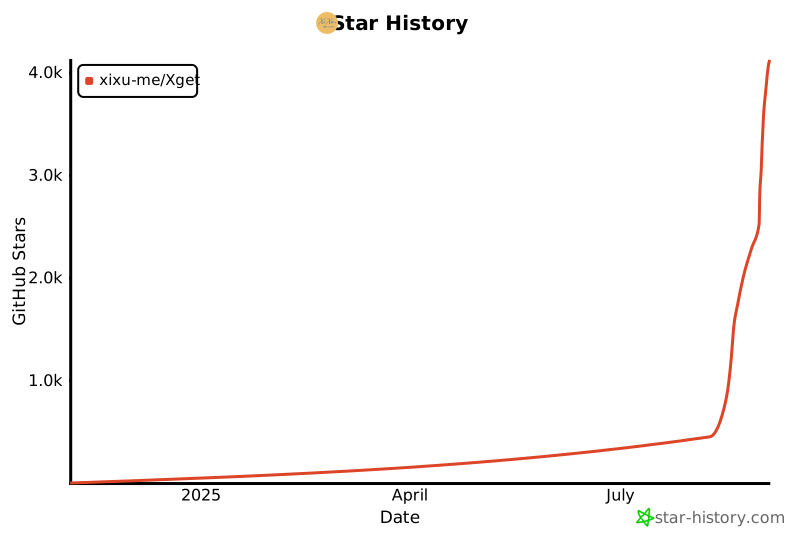
## 🌟 Star 历史
## 📞 联系方式
- **作者**: [Xi Xu](https://xi-xu.me)
- **邮箱**: [联系邮箱](mailto:i@xi-xu.me)
- **赞助**: [赞助 URL](https://xi-xu.me/#sponsorships)
## 📝 许可证
版权所有 © Xi Xu。
本存储库采用 GPL-3.0 许可证 - 查看 [LICENSE](LICENSE) 文件了解详情。
---
**如果这个存储库对您有帮助,请考虑给它一个 ⭐ star!**
Made with ❤️ by [Xi Xu](https://xi-xu.me)