# PowerJob
**Repository Path**: secosun/PowerJob
## Basic Information
- **Project Name**: PowerJob
- **Description**: 新一代分布式任务调度与计算框架,支持CRON、API、固定频率、固定延迟等调度策略,提供工作流来编排任务解决依赖关系,使用简单,功能强大,文档齐全,欢迎各位接入使用!
- **Primary Language**: Java
- **License**: Apache-2.0
- **Default Branch**: master
- **Homepage**: http://www.powerjob.tech/
- **GVP Project**: No
## Statistics
- **Stars**: 0
- **Forks**: 868
- **Created**: 2024-10-25
- **Last Updated**: 2025-11-11
## Categories & Tags
**Categories**: Uncategorized
**Tags**: None
## README
# English | [简体中文](./README_zhCN.md)
🏮PowerJob 全体成员祝大家龙年腾飞,新的一年身体健康,万事如意,阖家欢乐,幸福安康!🏮





[PowerJob](https://github.com/PowerJob/PowerJob) is an open-source distributed computing and job scheduling framework which allows developers to easily schedule tasks in their own application.
Refer to [PowerJob Introduction](https://www.yuque.com/powerjob/en/introduce) for detailed information.
# Introduction
### Features
- **Friendly UI:** [Front-end](http://try.powerjob.tech/#/welcome?appName=powerjob-agent-test&password=123) page is provided and developers can manage their task, monitor the status, check the logs online, etc.
- **Abundant Timing Strategies:** Four timing strategies are supported, including CRON expression, fixed rate, fixed delay and OpenAPI which allows you to define your own scheduling policies, such as delaying execution.
- **Multiple Execution Mode:** Four execution modes are supported, including stand-alone, broadcast, Map and MapReduce. Distributed computing resource could be utilized in MapReduce mode, try the magic out [here](https://www.yuque.com/powerjob/en/za1d96#9YOnV)!
- **Workflow(DAG) Support:** Both job dependency management and data communications between jobs are supported.
- **Extensive Processor Support:** Developers can write their processors in Java, Shell, Python, and will subsequently support multilingual scheduling via HTTP.
- **Powerful Disaster Tolerance:** As long as there are enough computing nodes, configurable retry policies make it possible for your task to be executed and finished successfully.
- **High Availability & High Performance:** PowerJob supports unlimited horizontal expansion. It's easy to achieve high availability and performance by deploying as many PowerJob server and worker nodes.
### Applicable scenes
- Timed tasks, for example, allocating e-coupons on 9 AM every morning.
- Broadcast tasks, for example, broadcasting to the cluster to clear logs.
- MapReduce tasks, for example, speeding up certain job like updating large amounts of data.
- Delayed tasks, for example, processing overdue orders.
- Customized tasks, triggered with [OpenAPI](https://www.yuque.com/powerjob/en/openapi).
### Online trial
- Address: [try.powerjob.tech](http://try.powerjob.tech/#/welcome?appName=powerjob-agent-test&password=123)
- Recommend reading the documentation first: [here](https://www.yuque.com/powerjob/en/trial)
# Documents
**[Docs](https://www.yuque.com/powerjob/en/introduce)**
**[中文文档](https://www.yuque.com/powerjob/guidence/intro)**
# Known Users
[Click to register as PowerJob user!](https://github.com/PowerJob/PowerJob/issues/6)
ღ( ´・ᴗ・\` )ღ Many thanks to the following registered users. ღ( ´・ᴗ・\` )ღ
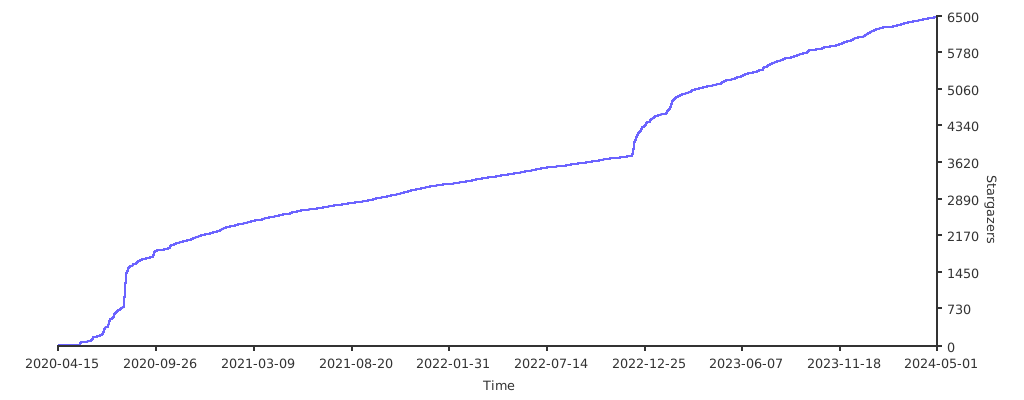
# Stargazers over time
[](https://starchart.cc/PowerJob/PowerJob)
# License
PowerJob is released under Apache License 2.0. Please refer to [License](./LICENSE) for details.
# Others
- Any developer interested in getting more involved in PowerJob may join our [Reddit](https://www.reddit.com/r/PowerJob) or [Gitter](https://gitter.im/PowerJob/community) community and make [contributions](https://github.com/PowerJob/PowerJob/pulls)!
- Reach out to me through email **tengjiqi@gmail.com**. Any issues or questions are welcomed on [Issues](https://github.com/PowerJob/PowerJob/issues).
- Look forward to your opinions. Response may be late but not denied.
//编译命令
mvn clean package -U -Pdev -DskipTests
java -jar powerjob-server.jar --spring.profiles.active=daily
java -jar powerjob-server/powerjob-server-starter/target/powerjob-server-starter-5.1.0.jar --spring.profiles.active=daily
//测试可以成功连接到数据库上
mongosh "mongodb://root:mongodb@mongodb-0.mongodb-headless.default.svc.cluster.local:27017/admin?retryWrites=true&w=majority"
mongosh "mongodb+srv://root:mongodb@mongodb-headless.default.svc.cluster.local/admin?retryWrites=true&w=majority&tls=false&ssl=false"
mongosh "mongodb+srv://root:mongodb@mongodb-headless.default.svc.cluster.local/admin?retryWrites=true&w=majority&tls=false&ssl=false&replicaSet=rs0"
内核参数修改需要在物理机上修改
echo "never" > /sys/kernel/mm/transparent_hugepage/defrag
echo "never" > /sys/kernel/mm/transparent_hugepage/enabled
安装mongodbsh
dpkg -i PowerJob/mongodb-mongosh_2.3.2_amd64.deb
headless服务的端口转发一定要在pod上进行才可以暴露成功
kubectl port-forward pod/mongodb-0 --address 0.0.0.0 27017:27017
kubectl port-forward svc/rpush-server --address 0.0.0.0 9092:9092
mvn spring-boot:run -pl powerjob-worker-samples
server端安装与启动命令
okteto up powerjob
mvn install -U -Pdev -DskipTests
mvn spring-boot:run -pl powerjob-server/powerjob-server-starter -DskipTests -Pdaily
worker端安装与启动命令
okteto up powerjobworker
mvn install -U -Pdev -DskipTests
mvn spring-boot:run -pl powerjob-worker-samples -DskipTests -Pdaily
获取集群令牌
kubectl -n kubernetes-dashboard create token admin-user
检查集群内部是否通信正常
apt-get update
apt-get install net-tools
apt-get install iputils-ping
powerjob.default.svc.cluster.local
#安装nslookup命令
apt-get install dnsutils
nslookup powerjob.default.svc.cluster.local
kubectl edit cm kube-proxy -n kube-system
cat > /etc/sysconfig/modules/ipvs.modules <
kubectl get pod -n kube-system | grep kube-proxy |awk '{system("kubectl delete pod "$1" -n kube-system")}'
kubectl get pod -n kube-system |grep kube-proxy
#端口转发powerjob server服务端框架
kubectl port-forward svc/powerjob --address 0.0.0.0 7700:7700
#登录命令
账号ADMIN
密码powerjob_admin
http://192.168.2.125:7700/#/oms/home
安装rpush sdk
mvn install:install-file -Dfile=PowerJob/others/rpush-sdk-0.0.1-SNAPSHOT.jar -DgroupId=com.regent.rpush.sdk -DartifactId=rpush-sdk -Dversion=1.0.0 -Dpackaging=jar
创建项目kafaka启动器
mvn archetype:generate -B "-DarchetypeGroupId=com.github.WangJi92" \
"-DarchetypeArtifactId=kunlun-boot-start-archetype" \
"-DarchetypeVersion=0.0.4" \
"-DgroupId=com.installall" \
"-Dpackage=com.installall.kafkaintegrated" \
"-DartifactId=kafka-integrated-spring-boot-starter" \
"-DspringBootVersion=2.7.18" \
"-DautoConfigName=BootStartKafka" \
"-DpropertiesPrefix=example.core" \
"-Dauthor=sunxike" \
"-Dversion=1.0-SNAPSHOT" \
"-Ddate=2024-4-13 12:19"
参考
https://blog.csdn.net/u012881904/article/details/138733415
创建一个测试项目
mvn archetype:generate \
-DgroupId=com.example \
-DartifactId=kafka-spring-boot-test \
-Dversion=1.0.0-SNAPSHOT \
-DarchetypeArtifactId=maven-archetype-quickstart \
-DinteractiveMode=false