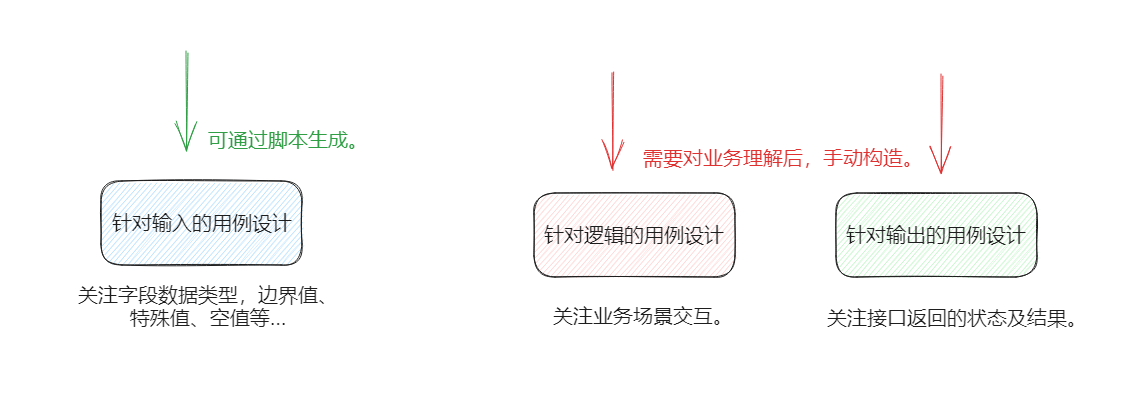
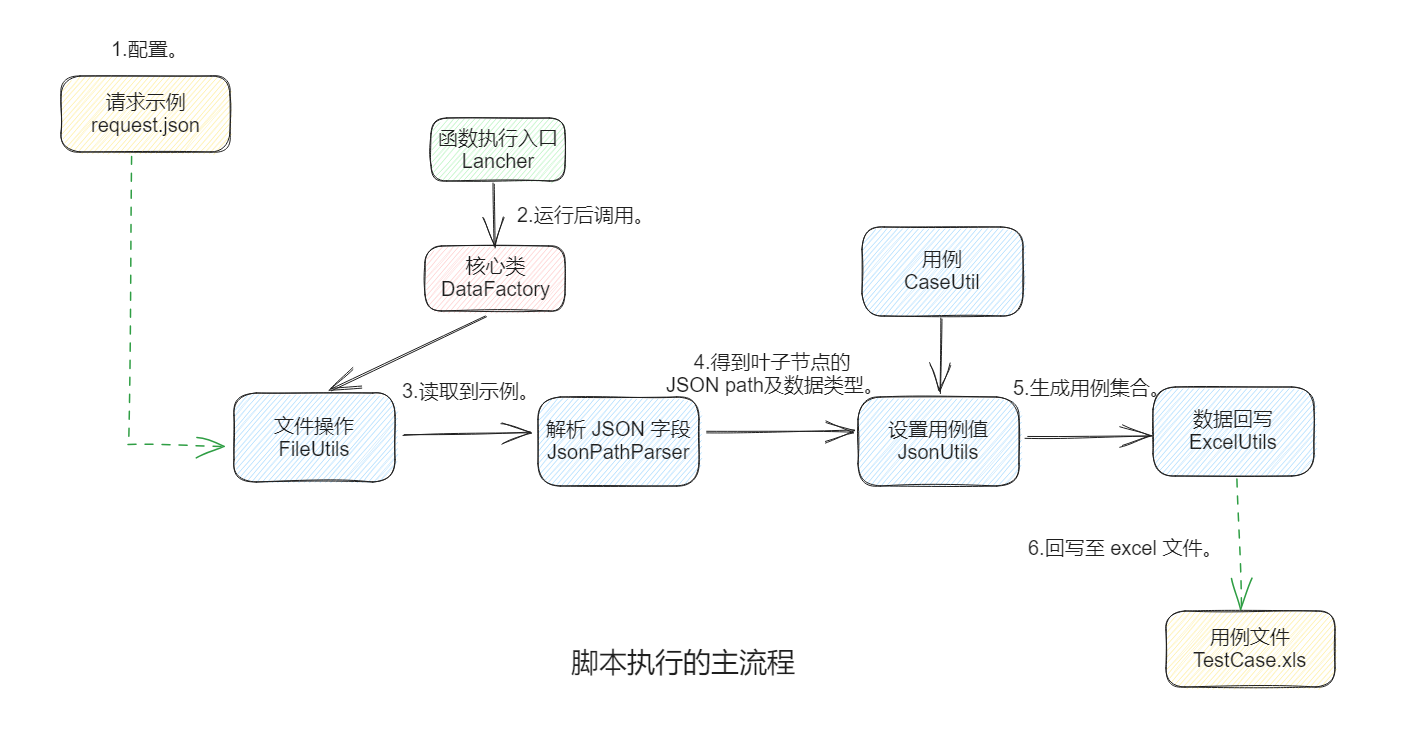
# 数据工厂-生成接口通用用例_1 **Repository Path**: rain_yang/datafactory_1 ## Basic Information - **Project Name**: 数据工厂-生成接口通用用例_1 - **Description**: 自动生成接口通用用例。 - **Primary Language**: Java - **License**: Not specified - **Default Branch**: master - **Homepage**: None - **GVP Project**: No ## Statistics - **Stars**: 0 - **Forks**: 5 - **Created**: 2023-10-07 - **Last Updated**: 2023-10-07 ## Categories & Tags **Categories**: Uncategorized **Tags**: None ## README ## 一、背景介绍 > 有哪些用例是可以通用且固定的? - 针对之前提到的**接口用例设计思路**,拆分为**三个切入点**: ![image-20230821164659789](https://noteimages-1310211961.cos.ap-chengdu.myqcloud.com/img/%E7%94%A8%E4%BE%8B%E8%AE%BE%E8%AE%A1%E6%80%9D%E8%B7%AF_202308211647918.png) - 举个例子: ```json { "field": "value" } ``` - 针对这个字符串类型的入参我们可以设计: - 当前数据类型入参(例如:空串,空格字符,特殊字符,字符个数上下限等。) - 非当前数据类型入参(例如:整型、浮点类型、布尔类型等。) - 特殊值(0、null值等。) ## 二、前置准备 > 运行数据工厂的前提条件。 - `java` 开发及运行环境。 - `maven` 构建工具。 - 使用到的依赖: ```xml com.alibaba fastjson 1.2.76 org.apache.poi poi 4.1.2 org.apache.poi poi-ooxml 4.1.2 ``` ## 三、设计思路 > 工具类之间是如何交互的。 - **包层级目录**: ```tex +---java | \---com | \---example | \---myproject | +---boot | | Launcher.java | | | +---core | | DataFactory.java | | | +---pojo | | WriteBackData.java | | | \---util | CaseUtils.java | ExcelUtils.java | FileUtils.java | JsonPathParser.java | JsonUtils.java | \---resources request.json TestCase.xls ``` - **脚本执行的主流程**: ![image-20230824164929529](https://noteimages-1310211961.cos.ap-chengdu.myqcloud.com/img/%E8%84%9A%E6%9C%AC%E6%89%A7%E8%A1%8C%E7%9A%84%E4%B8%BB%E6%B5%81%E7%A8%8B.png) ## 四、代码具体实现 - **Launcher**(启动类): ```java package com.example.myproject.boot; import com.alibaba.fastjson.JSONObject; import com.example.myproject.core.DataFactory; /** * 执行入口。 * * @author Jan * @date 2023/08 */ public class Launcher { public static void main(String[] args) throws Exception { // 这里支持传入自定义的用例拓展字段 -> new JSONObject() 。 DataFactory.runAndCreateTestCases(null); } } ``` - **DataFactory**(核心类): ```java package com.example.myproject.core; import com.alibaba.fastjson.JSON; import com.alibaba.fastjson.JSONObject; import com.alibaba.fastjson.JSONPath; import com.example.myproject.pojo.WriteBackData; import com.example.myproject.util.*; import java.lang.reflect.Array; import java.lang.reflect.InvocationTargetException; import java.lang.reflect.Method; import java.util.*; /** * 数据工厂。 * * @author Jan * @date 2023/08 */ public class DataFactory { private DataFactory() { } /** * 回写数据的集合。 */ private static final List WRITE_BACK_DATA = new ArrayList<>(); /** * 运行和创建测试用例。 * * @param ext ext 额外的拓展参数。 * @throws Exception 异常。 */ public static void runAndCreateTestCases(JSONObject ext) throws Exception { // 获取请求示例。 String jsonStr = FileUtils.readSampleRequest(); // 解析json的字段数据类型及jsonPath。 Set jsonPaths = JsonPathParser.getJsonPaths(jsonStr); for (String jsonPath : jsonPaths) { // 字段数据类型。 String filedDataType = JSONPath.read(jsonStr, jsonPath).getClass().getSimpleName(); // 跳过复合类型。 if ("JSONObject".equals(filedDataType)) { continue; } // 字段名。 String[] split = jsonPath.split("\\."); String filedName = split[split.length - 1]; // 通过反射生成对应数据类型的测试用例。 List caseValues = DataFactory.getObjectArrayFromReflectType(CaseUtils.class, filedDataType); Map caseNameAndRequestValueMap = new HashMap<>(); for (Object value : caseValues) { String caseName = CaseUtils.createSpecifyCaseNameByCaseValue(filedName, value); // 修改字段值。 JSONObject jsonObject = JsonUtils.checkAndSetJsonPathValue(jsonStr, jsonPath, value); caseNameAndRequestValueMap.put(caseName, jsonObject.toJSONString()); } for (Map.Entry entry : caseNameAndRequestValueMap.entrySet()) { String caseName = entry.getKey(); String requestValue = ""; if (null != ext) { // 额外参数。 ext.put("title", caseName); ext.put("case", JSON.parseObject(entry.getValue())); requestValue = ext.toJSONString(); } else { requestValue = entry.getValue(); } WRITE_BACK_DATA.add(new WriteBackData(caseName, requestValue)); } } System.out.println("组装完成的用例数为 = " + WRITE_BACK_DATA.size()); //开始回写 ExcelUtils.initFileAndWriteDataToExcel(WRITE_BACK_DATA); } /** * 通过反射获取用例集合。 * * @param clazz clazz * @param type 类型 * @return {@link List}<{@link Object}> * @throws NoSuchMethodException 没有这样方法异常。 * @throws InvocationTargetException 调用目标异常。 * @throws InstantiationException 实例化异常。 * @throws IllegalAccessException 非法访问异常。 */ private static List getObjectArrayFromReflectType(Class clazz, String type) throws NoSuchMethodException, InvocationTargetException, InstantiationException, IllegalAccessException { Object obj = clazz.getConstructor().newInstance(); String methodName = "get" + type + "TypeCases"; Method method = clazz.getDeclaredMethod(methodName); Object invoke = method.invoke(obj); int length = Array.getLength(invoke); List caseValues = new ArrayList<>(); for (int i = 0; i < length; i++) { caseValues.add(Array.get(invoke, i)); } return caseValues; } } ``` - **WriteBackData**(封装回写信息): ```java package com.example.myproject.pojo; /** * 回写对象。 * * @author Jan * @date 2023/08 */ public class WriteBackData { /** * 用例名称。 */ private String caseName; /** * 操作步骤。(即用例报文) */ private String step; public WriteBackData(String caseName, String step) { this.caseName = caseName; this.step = step; } public String getCaseName() { return caseName; } public void setCaseName(String caseName) { this.caseName = caseName; } public String getStep() { return step; } public void setStep(String step) { this.step = step; } } ``` - **CaseUtils**(静态存放用例设计): ```java package com.example.myproject.util; import java.util.Arrays; import java.util.Collections; /** * 测试用例。 * * @author Jan * @date 2023/08 */ public class CaseUtils { private static final String STRING = "string"; private static final String INTERFACE = "[接口名]"; /** * 字符串类型用例。 * 空串、空格字符、特殊字符、整型、精度类型、null值。 * * @return {@link Object[]} */ public static Object[] getStringTypeCases() { return new Object[]{"", " ", "@", -1, -1.1, "null"}; } /** * 整数类型用例。 * 字符串类型、特殊值0、负数值、整型较大值、整型边界值、精度类型、null值。 * * @return {@link Object[]} */ public static Object[] getIntegerTypeCases() { return new Object[]{STRING, 0, -1, 2147483647, 2147483648L, -1.1, "null"}; } /** * 长整型用例。 * 字符串类型、特殊值0、负数值、精度类型、null值、长整型边界值。 * * @return {@link Object[]} */ public static Object[] getLongTypeCases() { return new Object[]{STRING, 0, -1, -1.1, "null", 9223372036854775807L}; } /** * 浮点类型用例。 * 字符串类型、负精度值、负整数值、null值、三位小数。 * * @return {@link Object[]} */ public static Object[] getBigDecimalTypeCases() { return new Object[]{STRING, -1.1, -1, 0, "null", 999.999D}; } /** * 布尔类型用例。 * 字符串类型、负精度值、负整数值、特殊值0、null值、真布尔、假布尔。 * * @return {@link Object[]} */ public static Object[] getBooleanTypeCases() { return new Object[]{STRING, -1, -1.1, 0, "null", true, false}; } /** * 集合类型用例。 * 字符串类型、负精度值、null值、负整数值、空集合、混合类型。 * * @return {@link Object[]} */ public static Object[] getJSONArrayTypeCases() { return new Object[]{ Collections.singletonList(STRING), Collections.singletonList(-1.1), Collections.singletonList(null), Collections.singletonList(-1), Collections.emptyList(), Arrays.asList(STRING, -1, -1.1) }; } /** * 创建指定用例名。 * * @param baseName 基本名称。 * @param value 值。 * @return {@link String} */ public static String createSpecifyCaseNameByCaseValue(String baseName, Object value) { String caseName = ""; if ("".equals(value)) { caseName = INTERFACE + baseName + "-传空 ".trim(); } else if (" ".equals(value)) { caseName = INTERFACE + baseName + "-传空格 ".trim(); } else if ("@".equals(value)) { caseName = INTERFACE + baseName + "-传特殊符号\"@\" ".trim(); } else if ("null".equals(value)) { caseName = INTERFACE + baseName + "-特殊值null ".trim(); } else if (STRING.equals(value)) { caseName = INTERFACE + baseName + "-传字符类型\"string\" ".trim(); } else if ("[string]".equals(value)) { caseName = INTERFACE + baseName + "-传字符串值类型集合 ".trim(); } else if ("[-1.1]".equals(value)) { caseName = INTERFACE + baseName + "-传精度值类型集合 ".trim(); } else if ("[null]".equals(value)) { caseName = INTERFACE + baseName + "-传null值集合 ".trim(); } else if ("[-1]".equals(value)) { caseName = INTERFACE + baseName + "-传整型值类型集合 ".trim(); } else if ("[]".equals(value)) { caseName = INTERFACE + baseName + "-传空集合 ".trim(); } else if ("[string, -1, -1.1]".equals(value)) { caseName = INTERFACE + baseName + "-传混合数据类型集合 ".trim(); } else { caseName = INTERFACE + baseName + "-传" + value + " ".trim(); } return caseName; } } ``` - **ExcelUtils**(excel 操作): ```java package com.example.myproject.util; import com.example.myproject.pojo.WriteBackData; import org.apache.poi.xssf.usermodel.XSSFCell; import org.apache.poi.xssf.usermodel.XSSFRow; import org.apache.poi.xssf.usermodel.XSSFSheet; import org.apache.poi.xssf.usermodel.XSSFWorkbook; import java.io.File; import java.io.FileOutputStream; import java.io.OutputStream; import java.util.List; /** * Excel 操作。 * * @author Jan * @date 2023/08 */ public class ExcelUtils { private ExcelUtils() { } /** * 写出路径。 */ private static final String OUT_PATH = "src/main/resources"; /** * 工作表名。 */ private static final String SHEET_NAME = "testCase"; /** * 用例写入resource目录。 * * @param writeBackDataList 回写数据列表。 */ public static void initFileAndWriteDataToExcel(List writeBackDataList) { File filePath = new File(OUT_PATH); FileUtils.initTestCaseFile(filePath); String testCaseFilePath = filePath + File.separator + FileUtils.getFileName(); ExcelUtils.writeExcel(writeBackDataList, testCaseFilePath); System.out.println(" ===> 用例写入完成"); } /** * 写入。 * * @param dataList 数据列表。 * @param filePath 文件路径。 */ private static void writeExcel(List dataList, String filePath) { try ( XSSFWorkbook workbook = new XSSFWorkbook(); OutputStream out = new FileOutputStream(filePath) ) { XSSFSheet sheet = workbook.createSheet(SHEET_NAME); // 第一行表头。 XSSFRow firstRow = sheet.createRow(0); XSSFCell[] cells = new XSSFCell[3]; String[] titles = new String[]{ "用例名称", "用例编号", "操作步骤(生成用例后,记得将\"null\"替换为null,9223372036854775807替换为9223372036854775808)" }; // 循环设置表头信息。 for (int i = 0; i < 3; i++) { cells[0] = firstRow.createCell(i); cells[0].setCellValue(titles[i]); } // 遍历数据集合,将数据写入 Excel 中。 for (int i = 0; i < dataList.size(); i++) { XSSFRow row = sheet.createRow(i + 1); WriteBackData writeBackData = dataList.get(i); //第一列 用例名 XSSFCell cell = row.createCell(0); cell.setCellValue(writeBackData.getCaseName()); //第二列 用例编号 cell = row.createCell(1); cell.setCellValue(i + 1); //第三列 操作步骤 cell = row.createCell(2); cell.setCellValue(writeBackData.getStep()); } workbook.write(out); } catch (Exception e) { e.printStackTrace(); } } } ``` - **FileUtils**(用例文件操作): ```java package com.example.myproject.util; import java.io.*; import java.nio.charset.StandardCharsets; import java.nio.file.Files; import java.nio.file.NoSuchFileException; import java.nio.file.Path; /** * 文件操作。 * * @author Jan * @date 2023/08 */ public class FileUtils { private FileUtils() { } /** * 生成的用例文件名。 */ private static final String FILE_NAME = "TestCase.xls"; /** * 读取文件流。 * * @param inputStream 输入流。 * @return {@link String} */ public static String readFileStream(InputStream inputStream) { StringBuilder sb = new StringBuilder(); try (BufferedReader reader = new BufferedReader( new InputStreamReader(inputStream, StandardCharsets.UTF_8)) ) { String line; while (null != (line = reader.readLine())) { sb.append(line); } } catch (IOException e) { e.printStackTrace(); } return sb.toString(); } /** * 读取请求示例。 * * @return {@link String} */ public static String readSampleRequest() { InputStream is = FileUtils.class.getClassLoader().getResourceAsStream("request.json"); return FileUtils.readFileStream(is); } /** * 用例文件名称。 * * @return {@link String} */ public static String getFileName() { return FILE_NAME; } /** * 初始化测试用例文件。 * * @param filePath 文件路径。 */ public static void initTestCaseFile(File filePath) { Path testFilePath = filePath.toPath().resolve(getFileName()); try { boolean deleted = Files.deleteIfExists(testFilePath); System.out.println(deleted ? "初始化开始 ===> 旧用例删除成功" : "用例初始化开始 ===> 旧用例删除失败"); } catch (NoSuchFileException e) { System.err.println("文件未找到:" + filePath); } catch (IOException e) { System.err.println("删除文件失败:" + e.getMessage()); } try { Files.createFile(testFilePath); System.out.println("用例初始化结束 ===> 新用例创建成功"); } catch (IOException e) { System.err.println("新用例创建失败:" + e.getMessage()); } } } ``` - **JsonPathParser**(递归解析得到叶子节点的 jsonPath): ```java package com.example.myproject.util; import com.alibaba.fastjson.JSON; import com.alibaba.fastjson.JSONArray; import com.alibaba.fastjson.JSONObject; import com.alibaba.fastjson.parser.ParserConfig; import java.util.HashSet; import java.util.Map; import java.util.Set; /** * 解析 json 得到具体字段的 jsonPath。 * * @author Jan * @date 2023/08 */ public class JsonPathParser { static { // 设置全局白名单,解析 pb3 中的 @type 类型。 ParserConfig.getGlobalInstance().setAutoTypeSupport(true); } private JsonPathParser() { } /** * 得到json路径。 * * @param jsonStr json str * @return {@link Set}<{@link String}> */ public static Set getJsonPaths(String jsonStr) { // 解析JSON字符串为JSON对象。 JSONObject jsonObj = JSON.parseObject(jsonStr); // 存储JSONPath路径的集合。 Set jsonPaths = new HashSet<>(); // 递归遍历JSON对象的所有字段,并提取出JSONPath路径。 parseJsonObj(jsonObj, "$", jsonPaths); return jsonPaths; } /** * 解析 json 对象。 * * @param jsonObj json obj。 * @param parentPath 父路径。 * @param jsonPaths json路径。 */ private static void parseJsonObj(JSONObject jsonObj, String parentPath, Set jsonPaths) { for (Map.Entry entry : jsonObj.entrySet()) { String key = entry.getKey(); // 跳过PBv3的类型标识。 if (key.contains("@type")) { continue; } Object value = jsonObj.get(key); String currPath = parentPath + "." + key; // 将当前字段的JSONPath路径添加到集合中。 jsonPaths.add(currPath); if (value instanceof JSONObject) { // 递归处理嵌套的JSON对象。 parseJsonObj((JSONObject) value, currPath, jsonPaths); } else if (value instanceof JSONArray) { // 递归处理嵌套的JSON数组。 parseJsonArray((JSONArray) value, currPath, jsonPaths); } } } /** * 解析 json 数组。 * * @param jsonArray json数组。 * @param parentPath 父路径。 * @param jsonPaths json路径。 */ private static void parseJsonArray(JSONArray jsonArray, String parentPath, Set jsonPaths) { for (int i = 0; i < jsonArray.size(); i++) { // 只取集合中第一个元素的字段。 if (0 < i) { continue; } Object value = jsonArray.get(i); String currPath = parentPath + "[" + i + "]"; if (value instanceof JSONObject) { // 递归处理嵌套的JSON对象。 parseJsonObj((JSONObject) value, currPath, jsonPaths); } else if (value instanceof JSONArray) { // 递归处理嵌套的JSON数组。 parseJsonArray((JSONArray) value, currPath, jsonPaths); } } } } ``` - **JsonUtils**(设置用例值): ```java package com.example.myproject.util; import com.alibaba.fastjson.JSON; import com.alibaba.fastjson.JSONObject; import com.alibaba.fastjson.JSONPath; /** * 替换字段值。 * * @author Jan * @date 2023/08 */ public class JsonUtils { private JsonUtils() { } /** * 检查并设置json路径值。 * * @param json json。 * @param jsonPath json路径。 * @param testCaseValue 测试用例价值。 * @return {@link JSONObject} */ public static JSONObject checkAndSetJsonPathValue(String json, String jsonPath, Object testCaseValue) { JSONObject jsonObject = null; try { jsonObject = JSON.parseObject(json); // 还原直接替换值 testCaseValue。 JSONPath.set(jsonObject, jsonPath, testCaseValue); } catch (Exception e) { System.err.println("error case:" + jsonPath); } return jsonObject; } } ``` ## 五、执行效果 > 测试一下。 - **被测 json 串**: ```json { "String":"str", "Int":1, "Float":0.1, "Long":622337203685477500, "Bool":true, "test":{ "Array":[ ] } } ``` - **运行测试**: ![测试运行](https://noteimages-1310211961.cos.ap-chengdu.myqcloud.com/img/%E8%BF%90%E8%A1%8C%E6%95%88%E6%9E%9C.gif) - **生成的最终用例**: ![image-20230824181728655](https://noteimages-1310211961.cos.ap-chengdu.myqcloud.com/img/%E7%94%9F%E6%88%90%E7%94%A8%E4%BE%8B%E7%BB%93%E6%9E%9C.png) ## 六、其他说明 - 支持 protobuf v3 转换的 json (@type 类型)。 - 脚本用例生成的优点: - 高效率,减少冗余操作。 - 避免编写出因人为失误导致的错误用例。 - 方便后期用例迭代。 - 综上所述,在 `json` 字段较多的情况下,提效尤为明显。 - 源码地址:https://gitee.com/Jan7/datafactory