# FileCodeBox
**Repository Path**: mirrors/FileCodeBox
## Basic Information
- **Project Name**: FileCodeBox
- **Description**: FileCodeBox 是一个轻量级文件快递柜,用户以匿名口令分享文本、文件,像拿快递一样取文件
- **Primary Language**: Python
- **License**: LGPL-3.0
- **Default Branch**: master
- **Homepage**: https://www.oschina.net/p/filecodebox
- **GVP Project**: No
## Statistics
- **Stars**: 49
- **Forks**: 13
- **Created**: 2022-12-20
- **Last Updated**: 2026-01-31
## Categories & Tags
**Categories**: Uncategorized
**Tags**: None
## README
# FileCodeBox
### 文件快递柜 - 匿名口令分享文本和文件

像拿快递一样取文件,无需注册,输入口令即可获取
[](https://github.com/vastsa/FileCodeBox/stargazers)
[](https://github.com/vastsa/FileCodeBox/network)
[](https://github.com/vastsa/FileCodeBox/issues)
[](https://github.com/vastsa/FileCodeBox/blob/master/LICENSE)
[](https://hub.docker.com/r/lanol/filecodebox)
[](https://www.python.org)
[](https://fastapi.tiangolo.com)
[](https://vuejs.org)
[English](./readme_en.md) | [在线演示](https://share.lanol.cn) | [部署教程](https://github.com/vastsa/FileCodeBox/wiki/部署教程) | [常见问题](https://github.com/vastsa/FileCodeBox/wiki/常见问题) | [QQ群: 739673698](https://qm.qq.com/q/PemPzhdEIM)
```bash
# 🚀 一键部署
docker run -d -p 12345:12345 -v /opt/FileCodeBox:/app/data --name filecodebox lanol/filecodebox:latest
# 国内镜像(如果上面拉取缓慢): docker.cnb.cool/aixk/filecodebox
```
|
### 🚀 轻量高效
- FastAPI + SQLite3 后端
- Vue3 + Element Plus 前端
- Docker 一键部署
- 资源占用极低
|
### 🔒 安全可靠
- IP 上传频率限制
- 提取码错误次数限制
- 文件自动过期清理
- 支持管理员认证
|
### 📤 便捷上传
- 拖拽上传
- 复制粘贴上传
- 命令行 curl 上传
- 批量文件上传
|
|
### 🎫 灵活分享
- 随机/自定义提取码
- 可设置有效期(时间/次数)
- 支持永久有效
- 文本和文件统一管理
|
### 💾 多存储支持
- 本地文件系统
- S3 兼容存储
- [OneDrive](./docs/guide/storage-onedrive.md)
- [OpenDAL](./docs/guide/storage-opendal.md)
|
### 🌍 国际化
- 简体中文
- 繁体中文
- English
- 响应式设计 / 深色模式
|
---
## 🖼️ 界面预览
> 前端源码仓库:[2024主题](https://github.com/vastsa/FileCodeBoxFronted) | [2023主题](https://github.com/vastsa/FileCodeBoxFronted2023)
🎨 新版界面 (2024)
📦 经典界面 (2023)
---
## 🚀 快速开始
### Docker 部署(推荐)
**方式一:Docker CLI**
```bash
# Docker Hub(推荐)
docker run -d --restart always -p 12345:12345 -v /opt/FileCodeBox:/app/data --name filecodebox lanol/filecodebox:latest
# 国内镜像(如果 Docker Hub 拉取缓慢)
docker run -d --restart always -p 12345:12345 -v /opt/FileCodeBox:/app/data --name filecodebox docker.cnb.cool/aixk/filecodebox
```
**方式二:Docker Compose**
```yaml
services:
filecodebox:
image: lanol/filecodebox:latest
container_name: filecodebox
restart: unless-stopped
ports:
- "12345:12345"
volumes:
- ./data:/app/data
environment:
- WORKERS=4
- LOG_LEVEL=info
```
```bash
docker compose up -d
```
**环境变量说明**
| 变量 | 默认值 | 说明 |
|------|--------|------|
| `HOST` | `::` | 监听地址(支持 IPv4/IPv6 双栈) |
| `PORT` | `12345` | 服务端口 |
| `WORKERS` | `4` | 工作进程数(建议设为 CPU 核心数) |
| `LOG_LEVEL` | `info` | 日志级别:`debug` / `info` / `warning` / `error` |
### 反向代理配置
使用 Nginx 时,请添加以下配置以正确获取客户端 IP:
```nginx
location / {
proxy_pass http://127.0.0.1:12345;
proxy_set_header Host $host;
proxy_set_header X-Real-IP $remote_addr;
proxy_set_header X-Forwarded-For $proxy_add_x_forwarded_for;
proxy_set_header X-Forwarded-Proto $scheme;
client_max_body_size 100m; # 根据需要调整上传大小限制
}
```
### 手动部署
```bash
# 1. 克隆项目
git clone https://github.com/vastsa/FileCodeBox.git
cd FileCodeBox
# 2. 安装依赖
pip install -r requirements.txt
# 3. 启动服务
python main.py
```
---
## 📖 使用指南
### 基础操作
| 操作 | 步骤 |
|------|------|
| **分享文件** | 打开网页 → 选择/拖拽文件 → 设置有效期 → 获取提取码 |
| **获取文件** | 打开网页 → 输入提取码 → 下载文件或查看文本 |
| **管理后台** | 访问 `/#/admin` → 输入密码 `FileCodeBox2023` |
### 命令行使用(curl)
点击展开 curl 使用示例
**上传文件**
```bash
# 基础上传(默认 1 天有效期)
curl -X POST "http://localhost:12345/share/file/" \
-F "file=@/path/to/file.txt"
# 指定 1 小时有效期
curl -X POST "http://localhost:12345/share/file/" \
-F "file=@/path/to/file.txt" \
-F "expire_value=1" \
-F "expire_style=hour"
# 指定下载 10 次后过期
curl -X POST "http://localhost:12345/share/file/" \
-F "file=@/path/to/file.txt" \
-F "expire_value=10" \
-F "expire_style=count"
```
**分享文本**
```bash
curl -X POST "http://localhost:12345/share/text/" \
-F "text=要分享的文本内容"
```
**下载文件**
```bash
curl -L "http://localhost:12345/share/select/?code=提取码" -o filename
```
**有效期参数**
| `expire_style` | 说明 |
|----------------|------|
| `day` | 天数 |
| `hour` | 小时 |
| `minute` | 分钟 |
| `count` | 下载次数 |
| `forever` | 永久有效 |
**返回示例**
```json
{
"code": 200,
"msg": "success",
"detail": {
"code": "abcd1234",
"name": "file.txt"
}
}
```
**需要认证时**(管理员关闭游客上传后)
```bash
# 1. 获取 token
curl -X POST "http://localhost:12345/admin/login" \
-H "Content-Type: application/json" \
-d '{"password": "FileCodeBox2023"}'
# 2. 携带 token 上传
curl -X POST "http://localhost:12345/share/file/" \
-H "Authorization: Bearer " \
-F "file=@/path/to/file.txt"
```
---
## 🛠 开发指南
### 项目结构
```
FileCodeBox/
├── apps/ # 应用模块
│ ├── admin/ # 管理后台
│ └── base/ # 基础功能
├── core/ # 核心模块
├── data/ # 数据目录(运行时生成)
├── docs/ # 文档
└── main.py # 入口文件
```
### 本地开发
**后端**
```bash
pip install -r requirements.txt
python main.py
```
**前端**
```bash
# 前端仓库: https://github.com/vastsa/FileCodeBoxFronted
cd fcb-fronted
npm install
npm run dev
```
### 技术栈
| 类别 | 技术 |
|------|------|
| **后端框架** | FastAPI 0.128+ / Uvicorn |
| **数据库** | SQLite + Tortoise ORM |
| **数据验证** | Pydantic 2.x |
| **异步支持** | aiofiles / aiohttp / aioboto3 |
| **对象存储** | S3 协议 / OneDrive / OpenDAL |
| **前端框架** | Vue 3 + Element Plus + Vite |
| **运行环境** | Python 3.8+ / Node.js 18+ |
| **容器化** | Docker / Docker Compose |
---
## ❓ 常见问题
如何修改上传大小限制?
在管理面板中修改 `uploadSize` 配置项。如果使用 Nginx 反向代理,还需修改 `client_max_body_size`。
如何配置存储引擎?
在管理面板中选择存储引擎类型并配置相应参数。支持本地存储、S3、OneDrive、OpenDAL 等。
如何备份数据?
备份 `data` 目录即可,包含数据库和上传的文件。
如何修改管理员密码?
登录管理面板后,在系统设置中修改 `adminPassword` 配置项。
更多问题请访问 [Wiki](https://github.com/vastsa/FileCodeBox/wiki/常见问题) 或加入 [QQ群: 739673698](https://qm.qq.com/q/PemPzhdEIM)
---
## 🤝 贡献指南
欢迎提交 Issue 和 Pull Request!
```bash
# 1. Fork 并克隆
git clone https://github.com/your-username/FileCodeBox.git
# 2. 创建分支
git checkout -b feature/your-feature
# 3. 提交更改
git commit -m "feat: add your feature"
# 4. 推送并创建 PR
git push origin feature/your-feature
```
---
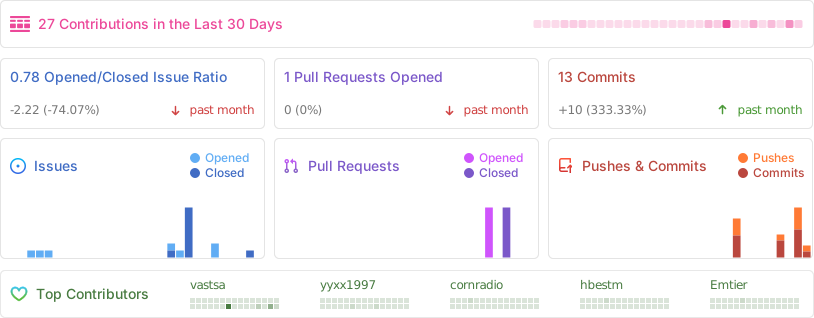
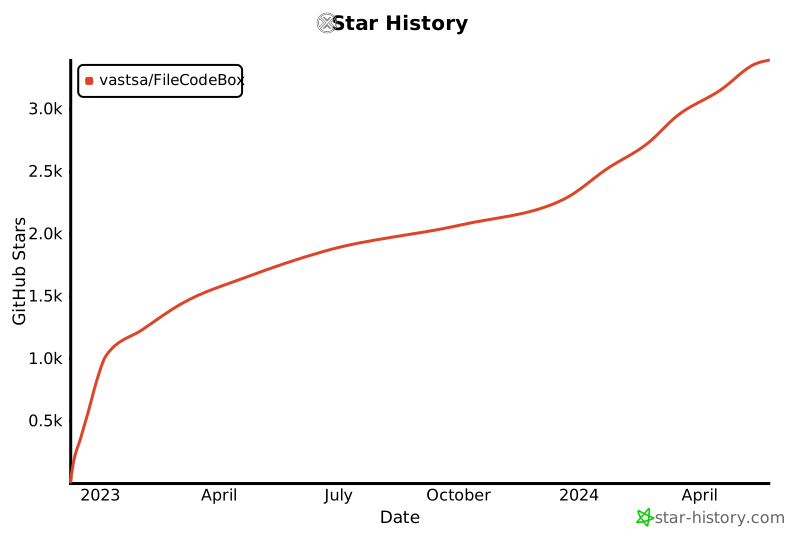
## 📊 项目统计

[](https://star-history.com/#vastsa/FileCodeBox&Date)
---
## 🗓 更新计划
- [ ] 2025 年新皮肤
- [ ] 文件收集功能
---
## 📜 免责声明
本项目开源仅供学习交流使用,不得用于任何违法用途,否则后果自负,与作者无关。使用本项目时请保留项目地址和版权信息。
---
**如果觉得项目不错,欢迎 ⭐ Star 支持!**
Made with ❤️ by [vastsa](https://github.com/vastsa)


