# lerna
**Repository Path**: michaelray/lerna
## Basic Information
- **Project Name**: lerna
- **Description**: https://github.com/lerna/lerna
- **Primary Language**: Unknown
- **License**: MIT
- **Default Branch**: main
- **Homepage**: None
- **GVP Project**: No
## Statistics
- **Stars**: 4
- **Forks**: 0
- **Created**: 2021-03-27
- **Last Updated**: 2023-04-21
## Categories & Tags
**Categories**: Uncategorized
**Tags**: None
## README

A tool for managing JavaScript projects with multiple packages.


- [About](#about)
- [Getting Started](#getting-started)
- [How It Works](#how-it-works)
- [Troubleshooting](#troubleshooting)
- Commands
- [`lerna publish`](./commands/publish#readme)
- [`lerna version`](./commands/version#readme)
- [`lerna bootstrap`](./commands/bootstrap#readme)
- [`lerna list`](./commands/list#readme)
- [`lerna changed`](./commands/changed#readme)
- [`lerna diff`](./commands/diff#readme)
- [`lerna exec`](./commands/exec#readme)
- [`lerna run`](./commands/run#readme)
- [`lerna init`](./commands/init#readme)
- [`lerna add`](./commands/add#readme)
- [`lerna clean`](./commands/clean#readme)
- [`lerna import`](./commands/import#readme)
- [`lerna link`](./commands/link#readme)
- [`lerna create`](./commands/create#readme)
- [`lerna info`](./commands/info#readme)
- [Concepts](#concepts)
- [Lerna.json](#lernajson)
- [Global Flags](./core/global-options)
- [Filter Flags](./core/filter-options)
## About
Splitting up large codebases into separate independently versioned packages
is extremely useful for code sharing. However, making changes across many
repositories is _messy_ and difficult to track, and testing across repositories
becomes complicated very quickly.
To solve these (and many other) problems, some projects will organize their
codebases into multi-package repositories (sometimes called [monorepos](https://github.com/babel/babel/blob/master/doc/design/monorepo.md)). Projects like [Babel](https://github.com/babel/babel/tree/master/packages), [React](https://github.com/facebook/react/tree/master/packages), [Angular](https://github.com/angular/angular/tree/master/modules),
[Ember](https://github.com/emberjs/ember.js/tree/master/packages), [Meteor](https://github.com/meteor/meteor/tree/devel/packages), [Jest](https://github.com/facebook/jest/tree/master/packages), and many others develop all of their packages within a
single repository.
**Lerna is a tool that optimizes the workflow around managing multi-package
repositories with git and npm.**
Lerna can also reduce the time and space requirements for numerous
copies of packages in development and build environments - normally a
downside of dividing a project into many separate NPM packages. See the
[hoist documentation](doc/hoist.md) for details.
### What does a Lerna repo look like?
There's actually very little to it. You have a file structure that looks like this:
```
my-lerna-repo/
package.json
packages/
package-1/
package.json
package-2/
package.json
```
### What can Lerna do?
The two primary commands in Lerna are `lerna bootstrap` and `lerna publish`.
`bootstrap` will link dependencies in the repo together.
`publish` will help publish any updated packages.
### What can't Lerna do?
Lerna is not a deployment tool for serverless monorepos. Hoisting might be incompatible with traditional serverless monorepo deployment techniques.
## Getting Started
> The instructions below are for Lerna 3.x.
> We recommend using it instead of 2.x for a new Lerna project.
Let's start by installing Lerna as a dev dependency of your project with [npm](https://www.npmjs.com/).
```sh
$ mkdir lerna-repo && cd $_
$ npx lerna init
```
This will create a `lerna.json` configuration file as well as a `packages` folder, so your folder should now look like this:
```
lerna-repo/
packages/
package.json
lerna.json
```
## How It Works
Lerna allows you to manage your project using one of two modes: Fixed or Independent.
### Fixed/Locked mode (default)
Fixed mode Lerna projects operate on a single version line. The version is kept in the `lerna.json` file at the root of your project under the `version` key. When you run `lerna publish`, if a module has been updated since the last time a release was made, it will be updated to the new version you're releasing. This means that you only publish a new version of a package when you need to.
> Note: If you have a major version zero, all updates are [considered breaking](https://semver.org/#spec-item-4). Because of that, running `lerna publish` with a major version zero and choosing any non-prerelease version number will cause new versions to be published for all packages, even if not all packages have changed since the last release.
This is the mode that [Babel](https://github.com/babel/babel) is currently using. Use this if you want to automatically tie all package versions together. One issue with this approach is that a major change in any package will result in all packages having a new major version.
### Independent mode
`lerna init --independent`
Independent mode Lerna projects allows maintainers to increment package versions independently of each other. Each time you publish, you will get a prompt for each package that has changed to specify if it's a patch, minor, major or custom change.
Independent mode allows you to more specifically update versions for each package and makes sense for a group of components. Combining this mode with something like [semantic-release](https://github.com/semantic-release/semantic-release) would make it less painful. (There is work on this already at [atlassian/lerna-semantic-release](https://github.com/atlassian/lerna-semantic-release)).
> Set the `version` key in `lerna.json` to `independent` to run in independent mode.
## Troubleshooting
If you encounter any issues while using Lerna please check out our [Troubleshooting](doc/troubleshooting.md)
document where you might find the answer to your problem.
## Frequently asked questions
See [FAQ.md](FAQ.md).
## Concepts
Lerna will log to a `lerna-debug.log` file (same as `npm-debug.log`) when it encounters an error running a command.
Lerna also has support for [scoped packages](https://docs.npmjs.com/misc/scope).
Run `lerna --help` to see all available commands and options.
### lerna.json
```json
{
"version": "1.1.3",
"npmClient": "npm",
"command": {
"publish": {
"ignoreChanges": ["ignored-file", "*.md"],
"message": "chore(release): publish",
"registry": "https://npm.pkg.github.com"
},
"bootstrap": {
"ignore": "component-*",
"npmClientArgs": ["--no-package-lock"]
}
},
"packages": ["packages/*"]
}
```
- `version`: the current version of the repository.
- `npmClient`: an option to specify a specific client to run commands with (this can also be specified on a per command basis). Change to `"yarn"` to run all commands with yarn. Defaults to "npm".
- `command.publish.ignoreChanges`: an array of globs that won't be included in `lerna changed/publish`. Use this to prevent publishing a new version unnecessarily for changes, such as fixing a `README.md` typo.
- `command.publish.message`: a custom commit message when performing version updates for publication. See [@lerna/version](commands/version#--message-msg) for more details.
- `command.publish.registry`: use it to set a custom registry url to publish to instead of
npmjs.org, you must already be authenticated if required.
- `command.bootstrap.ignore`: an array of globs that won't be bootstrapped when running the `lerna bootstrap` command.
- `command.bootstrap.npmClientArgs`: array of strings that will be passed as arguments directly to `npm install` during the `lerna bootstrap` command.
- `command.bootstrap.scope`: an array of globs that restricts which packages will be bootstrapped when running the `lerna bootstrap` command.
- `packages`: Array of globs to use as package locations.
The packages config in `lerna.json` is a list of globs that match directories containing a `package.json`, which is how lerna recognizes "leaf" packages (vs the "root" `package.json`, which is intended to manage the dev dependencies and scripts for the entire repo).
By default, lerna initializes the packages list as `["packages/*"]`, but you can also use another directory such as `["modules/*"]`, or `["package1", "package2"]`. The globs defined are relative to the directory that `lerna.json` lives in, which is usually the repository root. The only restriction is that you can't directly nest package locations, but this is a restriction shared by "normal" npm packages as well.
For example, `["packages/*", "src/**"]` matches this tree:
```
packages/
├── foo-pkg
│ └── package.json
├── bar-pkg
│ └── package.json
├── baz-pkg
│ └── package.json
└── qux-pkg
└── package.json
src/
├── admin
│ ├── my-app
│ │ └── package.json
│ ├── stuff
│ │ └── package.json
│ └── things
│ └── package.json
├── profile
│ └── more-things
│ └── package.json
├── property
│ ├── more-stuff
│ │ └── package.json
│ └── other-things
│ └── package.json
└── upload
└── other-stuff
└── package.json
```
Locating leaf packages under `packages/*` is considered a "best-practice", but is not a requirement for using Lerna.
#### Legacy Fields
Some `lerna.json` fields are no longer in use. Those of note include:
- `lerna`: originally used to indicate the current version of Lerna. [Made obsolete](https://github.com/lerna/lerna/pull/1122) and [removed](https://github.com/lerna/lerna/pull/1225) in v3
### Common `devDependencies`
Most `devDependencies` can be pulled up to the root of a Lerna repo with `lerna link convert`
The above command will automatically hoist things and use relative `file:` specifiers.
Hoisting has a few benefits:
- All packages use the same version of a given dependency
- Can keep dependencies at the root up-to-date with an automated tool such as [Snyk](https://snyk.io/)
- Dependency installation time is reduced
- Less storage is needed
Note that `devDependencies` providing "binary" executables that are used by
npm scripts still need to be installed directly in each package where they're
used.
For example the `nsp` dependency is necessary in this case for `lerna run nsp`
(and `npm run nsp` within the package's directory) to work correctly:
```json
{
"scripts": {
"nsp": "nsp"
},
"devDependencies": {
"nsp": "^2.3.3"
}
}
```
### Git Hosted Dependencies
Lerna allows target versions of local dependent packages to be written as a [git remote url](https://docs.npmjs.com/cli/install) with a `committish` (e.g., `#v1.0.0` or `#semver:^1.0.0`) instead of the normal numeric version range.
This allows packages to be distributed via git repositories when packages must be private and a [private npm registry is not desired](https://www.dotconferences.com/2016/05/fabien-potencier-monolithic-repositories-vs-many-repositories).
Please note that lerna does _not_ perform the actual splitting of git history into the separate read-only repositories. This is the responsibility of the user. (See [this comment](https://github.com/lerna/lerna/pull/1033#issuecomment-335894690) for implementation details)
```
// packages/pkg-1/package.json
{
name: "pkg-1",
version: "1.0.0",
dependencies: {
"pkg-2": "github:example-user/pkg-2#v1.0.0"
}
}
// packages/pkg-2/package.json
{
name: "pkg-2",
version: "1.0.0"
}
```
In the example above,
- `lerna bootstrap` will properly symlink `pkg-2` into `pkg-1`.
- `lerna publish` will update the committish (`#v1.0.0`) in `pkg-1` when `pkg-2` changes.
### README Badge
Using Lerna? Add a README badge to show it off: [](https://lerna.js.org/)
```
[](https://lerna.js.org/)
```
### Wizard
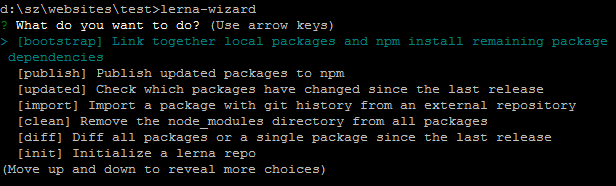
If you prefer some guidance for cli (in case you're about to start using lerna or introducing it to a new team), you might like [lerna-wizard](https://github.com/szarouski/lerna-wizard). It will lead you through a series of well-defined steps: