# Android-SwitchDateTimePicker
**Repository Path**: lirui1100/Android-SwitchDateTimePicker
## Basic Information
- **Project Name**: Android-SwitchDateTimePicker
- **Description**: No description available
- **Primary Language**: Unknown
- **License**: Apache-2.0
- **Default Branch**: master
- **Homepage**: None
- **GVP Project**: No
## Statistics
- **Stars**: 0
- **Forks**: 0
- **Created**: 2021-11-04
- **Last Updated**: 2021-11-04
## Categories & Tags
**Categories**: Uncategorized
**Tags**: None
## README
[](http://android-arsenal.com/details/1/4513)
# Android SwitchDateTime Picker
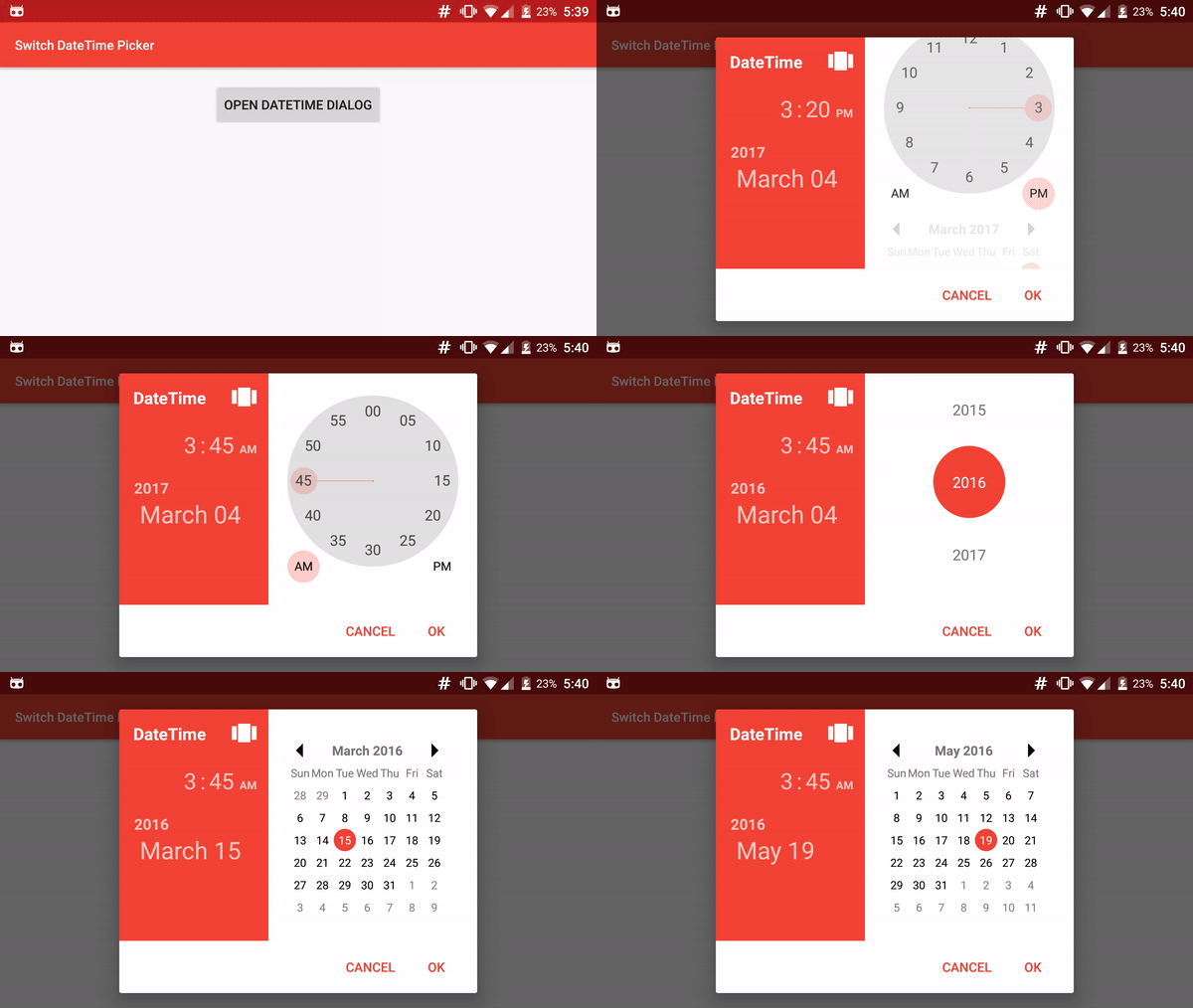
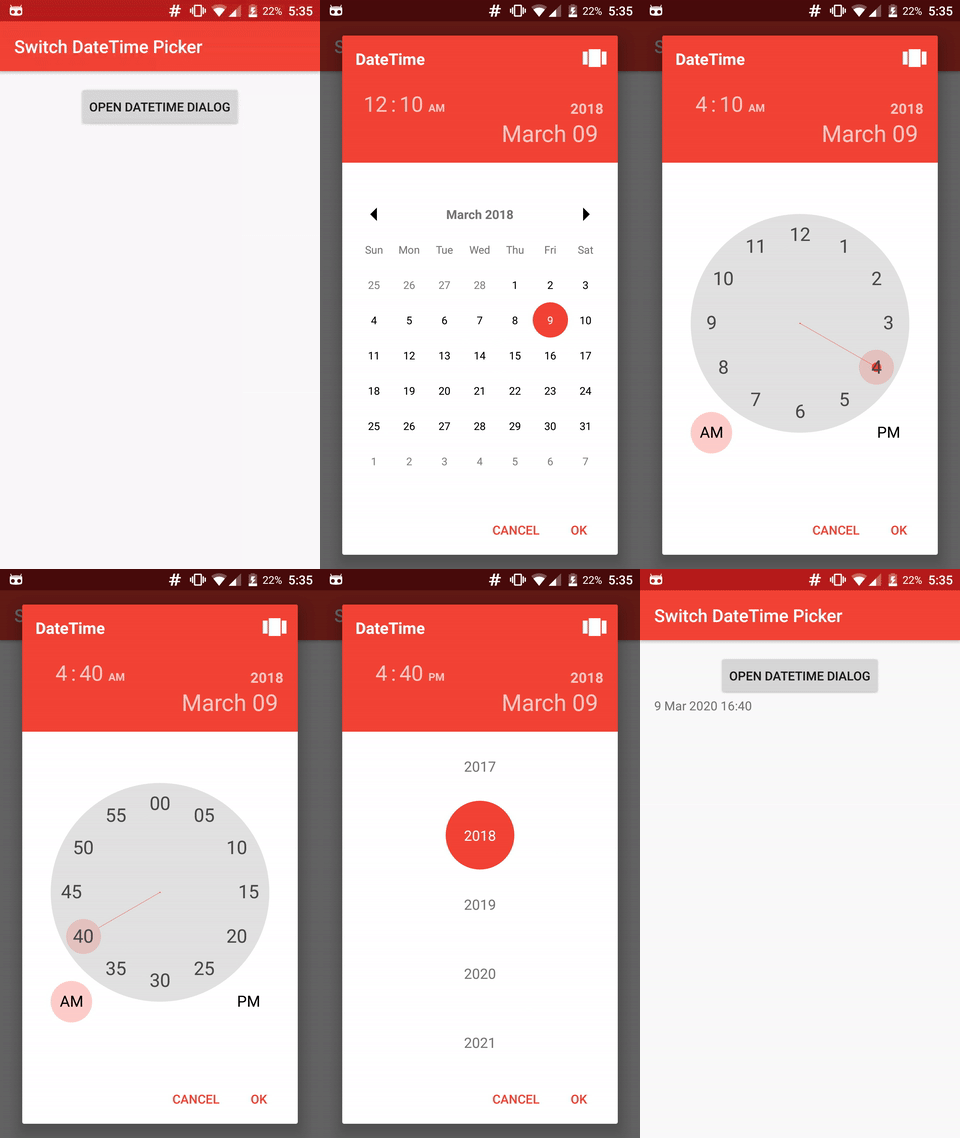
 SwitchDateTime Picker is a library for select a *Date* object in dialog with a DatePicker (Calendar) and a TimePicker (Clock) in the same UI.
 ## Contributions
You can contribute in different ways to help us on our work.
* Add features by a pull request.
* Help to translate into your language
* [Donate](https://www.kunzisoft.com/donation) 人◕ ‿‿ ◕人Y for a better service and a quick development of your features.
## Installation
Add the JitPack repository in your build.gradle at the end of repositories:
```
allprojects {
repositories {
...
maven { url "https://jitpack.io" }
}
}
```
And add the dependency
[](https://jitpack.io/#Kunzisoft/Android-SwitchDateTimePicker)
*replacing ${version} with the version number in jitpack*
```
dependencies {
compile 'com.github.Kunzisoft:Android-SwitchDateTimePicker:${version}'
}
```
## Usage
### SimpleDateFormat for Day and Month
You can specify a particular [*SimpleDateFormat*](https://docs.oracle.com/javase/7/docs/api/java/text/SimpleDateFormat.html) for value of Day and Month with **setSimpleDateMonthAndDayFormat(SimpleDateFormat format)**
Warning, the format must satisfy the regular expression : **(M|w|W|D|d|F|E|u|\s)***
, for example *dd MMMM*
### 24 Hours mode
By default, time is in 12 hours mode, If you want a 24-hour display, use:
`dateTimeFragment.set24HoursMode(true);`
before the "show"
#### Hightligh selected AM / PM
In 24 hours mode, If you want to highlight the selected AM or PM, use :
`dateTimeFragment.setHighlightAMPMSelection(true);`
### Start with a specific view
For launch Dialog with a specific view, call :
`dateTimeFragment.startAtTimeView();`, `dateTimeFragment.startAtCalendarView();` or `dateTimeFragment.startAtYearView();`
before the "show"
### Define minimum and maximum
For just allow selection after or/and before dates, use :
`dateTimeFragment.setMinimumDateTime(Date minimum);`
and
`dateTimeFragment.setMaximumDateTime(Date maximum);`
### TimeZone
Optionally define a timezone :
`dateTimeFragment.setTimeZone(TimeZone.getDefault());`
### Style
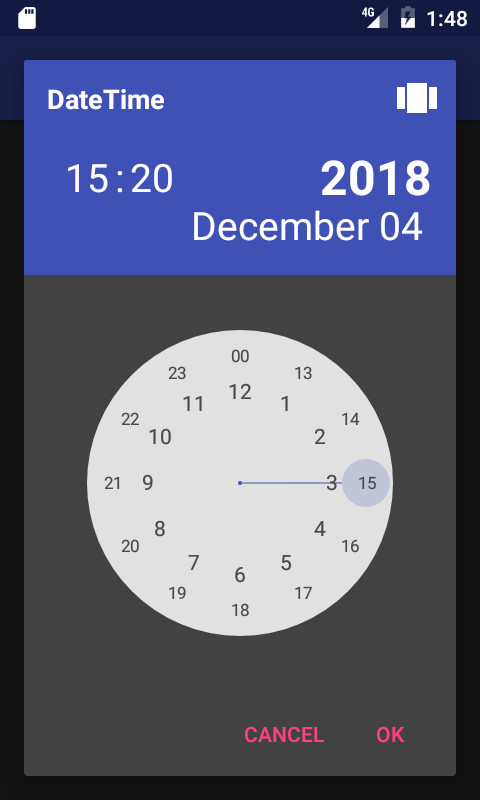
You can customize the style to change color, bold, etc... of each element.
You need to use a Theme.AppCompat theme (or descendant) with SwitchDateTime's activity. (`compile 'com.android.support:appcompat-v7:25.1.0'` in gradle)
## Contributions
You can contribute in different ways to help us on our work.
* Add features by a pull request.
* Help to translate into your language
* [Donate](https://www.kunzisoft.com/donation) 人◕ ‿‿ ◕人Y for a better service and a quick development of your features.
## Installation
Add the JitPack repository in your build.gradle at the end of repositories:
```
allprojects {
repositories {
...
maven { url "https://jitpack.io" }
}
}
```
And add the dependency
[](https://jitpack.io/#Kunzisoft/Android-SwitchDateTimePicker)
*replacing ${version} with the version number in jitpack*
```
dependencies {
compile 'com.github.Kunzisoft:Android-SwitchDateTimePicker:${version}'
}
```
## Usage
### SimpleDateFormat for Day and Month
You can specify a particular [*SimpleDateFormat*](https://docs.oracle.com/javase/7/docs/api/java/text/SimpleDateFormat.html) for value of Day and Month with **setSimpleDateMonthAndDayFormat(SimpleDateFormat format)**
Warning, the format must satisfy the regular expression : **(M|w|W|D|d|F|E|u|\s)***
, for example *dd MMMM*
### 24 Hours mode
By default, time is in 12 hours mode, If you want a 24-hour display, use:
`dateTimeFragment.set24HoursMode(true);`
before the "show"
#### Hightligh selected AM / PM
In 24 hours mode, If you want to highlight the selected AM or PM, use :
`dateTimeFragment.setHighlightAMPMSelection(true);`
### Start with a specific view
For launch Dialog with a specific view, call :
`dateTimeFragment.startAtTimeView();`, `dateTimeFragment.startAtCalendarView();` or `dateTimeFragment.startAtYearView();`
before the "show"
### Define minimum and maximum
For just allow selection after or/and before dates, use :
`dateTimeFragment.setMinimumDateTime(Date minimum);`
and
`dateTimeFragment.setMaximumDateTime(Date maximum);`
### TimeZone
Optionally define a timezone :
`dateTimeFragment.setTimeZone(TimeZone.getDefault());`
### Style
You can customize the style to change color, bold, etc... of each element.
You need to use a Theme.AppCompat theme (or descendant) with SwitchDateTime's activity. (`compile 'com.android.support:appcompat-v7:25.1.0'` in gradle)
 In your *styles.xml*, you can redefine each style separately, but you must keep each item, for example : change size of "year label"
```
```
Styles elements : https://github.com/Kunzisoft/Android-SwitchDateTimePicker/blob/master/switchdatetime/src/main/res/values/styles.xml
#### AlertStyle
To customize the AlertDialog that is shown, use :
`void setAlertStyle(@StyleRes int styleId)`
### Sample
You can see
https://github.com/J-Jamet/Android-SwitchDateTimePicker/blob/master/sample/src/main/java/com/kunzisoft/switchdatetimesample/Sample.java
for complete sample.
```
// Initialize
SwitchDateTimeDialogFragment dateTimeDialogFragment = SwitchDateTimeDialogFragment.newInstance(
"Title example",
"OK",
"Cancel"
);
// Assign values
dateTimeDialogFragment.startAtCalendarView();
dateTimeDialogFragment.set24HoursMode(true);
dateTimeDialogFragment.setMinimumDateTime(new GregorianCalendar(2015, Calendar.JANUARY, 1).getTime());
dateTimeDialogFragment.setMaximumDateTime(new GregorianCalendar(2025, Calendar.DECEMBER, 31).getTime());
dateTimeDialogFragment.setDefaultDateTime(new GregorianCalendar(2017, Calendar.MARCH, 4, 15, 20).getTime());
// Define new day and month format
try {
dateTimeDialogFragment.setSimpleDateMonthAndDayFormat(new SimpleDateFormat("dd MMMM", Locale.getDefault()));
} catch (SwitchDateTimeDialogFragment.SimpleDateMonthAndDayFormatException e) {
Log.e(TAG, e.getMessage());
}
// Set listener
dateTimeDialogFragment.setOnButtonClickListener(new SwitchDateTimeDialogFragment.OnButtonClickListener() {
@Override
public void onPositiveButtonClick(Date date) {
// Date is get on positive button click
// Do something
}
@Override
public void onNegativeButtonClick(Date date) {
// Date is get on negative button click
}
});
// Show
dateTimeDialogFragment.show(getSupportFragmentManager(), "dialog_time");
```
#### Neutral button
In your *styles.xml*, you can redefine each style separately, but you must keep each item, for example : change size of "year label"
```
```
Styles elements : https://github.com/Kunzisoft/Android-SwitchDateTimePicker/blob/master/switchdatetime/src/main/res/values/styles.xml
#### AlertStyle
To customize the AlertDialog that is shown, use :
`void setAlertStyle(@StyleRes int styleId)`
### Sample
You can see
https://github.com/J-Jamet/Android-SwitchDateTimePicker/blob/master/sample/src/main/java/com/kunzisoft/switchdatetimesample/Sample.java
for complete sample.
```
// Initialize
SwitchDateTimeDialogFragment dateTimeDialogFragment = SwitchDateTimeDialogFragment.newInstance(
"Title example",
"OK",
"Cancel"
);
// Assign values
dateTimeDialogFragment.startAtCalendarView();
dateTimeDialogFragment.set24HoursMode(true);
dateTimeDialogFragment.setMinimumDateTime(new GregorianCalendar(2015, Calendar.JANUARY, 1).getTime());
dateTimeDialogFragment.setMaximumDateTime(new GregorianCalendar(2025, Calendar.DECEMBER, 31).getTime());
dateTimeDialogFragment.setDefaultDateTime(new GregorianCalendar(2017, Calendar.MARCH, 4, 15, 20).getTime());
// Define new day and month format
try {
dateTimeDialogFragment.setSimpleDateMonthAndDayFormat(new SimpleDateFormat("dd MMMM", Locale.getDefault()));
} catch (SwitchDateTimeDialogFragment.SimpleDateMonthAndDayFormatException e) {
Log.e(TAG, e.getMessage());
}
// Set listener
dateTimeDialogFragment.setOnButtonClickListener(new SwitchDateTimeDialogFragment.OnButtonClickListener() {
@Override
public void onPositiveButtonClick(Date date) {
// Date is get on positive button click
// Do something
}
@Override
public void onNegativeButtonClick(Date date) {
// Date is get on negative button click
}
});
// Show
dateTimeDialogFragment.show(getSupportFragmentManager(), "dialog_time");
```
#### Neutral button
 To use with a neutral button, initialize with another parameter and implement the *OnButtonWithNeutralClickListener* :
```
SwitchDateTimeDialogFragment dateTimeDialogFragment = SwitchDateTimeDialogFragment.newInstance(
"Title example",
"OK",
"Cancel",
"Clean"
);
dateTimeFragment.setOnButtonClickListener(new SwitchDateTimeDialogFragment.OnButtonWithNeutralClickListener() {
@Override
public void onPositiveButtonClick(Date date) {
}
@Override
public void onNegativeButtonClick(Date date) {
}
@Override
public void onNeutralButtonClick(Date date) {
}
});
```
## Bonus
You can follow the project live on https://www.livecoding.tv/kunzisoft/
## License
Copyright (c) 2016 JAMET Jeremy
Licensed under the Apache License, Version 2.0 (the "License");
you may not use this file except in compliance with the License.
You may obtain a copy of the License at
http://www.apache.org/licenses/LICENSE-2.0
Unless required by applicable law or agreed to in writing, software
distributed under the License is distributed on an "AS IS" BASIS,
WITHOUT WARRANTIES OR CONDITIONS OF ANY KIND, either express or implied.
See the License for the specific language governing permissions and
limitations under the License.
To use with a neutral button, initialize with another parameter and implement the *OnButtonWithNeutralClickListener* :
```
SwitchDateTimeDialogFragment dateTimeDialogFragment = SwitchDateTimeDialogFragment.newInstance(
"Title example",
"OK",
"Cancel",
"Clean"
);
dateTimeFragment.setOnButtonClickListener(new SwitchDateTimeDialogFragment.OnButtonWithNeutralClickListener() {
@Override
public void onPositiveButtonClick(Date date) {
}
@Override
public void onNegativeButtonClick(Date date) {
}
@Override
public void onNeutralButtonClick(Date date) {
}
});
```
## Bonus
You can follow the project live on https://www.livecoding.tv/kunzisoft/
## License
Copyright (c) 2016 JAMET Jeremy
Licensed under the Apache License, Version 2.0 (the "License");
you may not use this file except in compliance with the License.
You may obtain a copy of the License at
http://www.apache.org/licenses/LICENSE-2.0
Unless required by applicable law or agreed to in writing, software
distributed under the License is distributed on an "AS IS" BASIS,
WITHOUT WARRANTIES OR CONDITIONS OF ANY KIND, either express or implied.
See the License for the specific language governing permissions and
limitations under the License.