叠加层。
*
* @param {{ color?: string; blur?: number }} [options]
* color: 叠加颜色(rgba/hex/hsl)。默认: 'rgba(0,0,0,0.25)'
* blur: 可选的模糊像素值(默认: 0)
*/
export function overlayFilterPlugin(options = {}) {
const color = options.color ?? 'rgba(0,0,0,0.25)';
const blur = Math.max(0, options.blur ?? 0);
return {
name: 'overlay-filter',
/**
* 在克隆的 HTML 根元素上添加全覆盖叠加层。
* @param {any} context
*/
async afterClone(context) {
const root = context.clone;
if (!(root instanceof HTMLElement)) return; // 仅 HTML
// 确保包含块,以便绝对定位的叠加层锚定到根元素
if (getComputedStyle(root).position === 'static') {
root.style.position = 'relative';
}
const overlay = document.createElement('div');
overlay.style.position = 'absolute';
overlay.style.left = '0';
overlay.style.top = '0';
overlay.style.right = '0';
overlay.style.bottom = '0';
overlay.style.background = color;
overlay.style.pointerEvents = 'none';
if (blur) overlay.style.filter = `blur(${blur}px)`;
root.appendChild(overlay);
}
};
}
```
**用法:**
```js
import { snapdom } from '@zumer/snapdom';
// 全局注册
snapdom.plugins([overlayFilterPlugin, { color: 'rgba(0,0,0,0.3)', blur: 2 }]);
// 单次捕获
const out = await snapdom(document.querySelector('#card'), {
plugins: [[overlayFilterPlugin, { color: 'rgba(255,200,0,0.15)' }]]
});
const png = await out.toPng();
document.body.appendChild(png);
```
> 叠加层仅注入到**克隆的树中**,永远不会注入到您的实时 DOM 中,确保完美保真度和零闪烁。
### 完整插件模板
使用此模板作为自定义逻辑或导出器的起点。
```js
export function myPlugin(options = {}) {
return {
/** 用于去重/覆盖的唯一名称 */
name: 'my-plugin',
/** 在任何克隆/样式工作之前的早期调整。 */
async beforeSnap(context) {},
/** 子树克隆之前(如果触及实时 DOM,请谨慎使用)。 */
async beforeClone(context) {},
/** 子树克隆之后(可以安全地修改克隆的树)。 */
async afterClone(context) {},
/** 序列化之前(SVG/dataURL)。 */
async beforeRender(context) {},
/** 序列化之后;如果需要,检查 context.svgString/context.dataURL。 */
async afterRender(context) {},
/** 每次导出调用之前(toPng/toSvg/toBlob/...)。 */
async beforeExport(context) {},
/**
* 每次导出调用之后。
* 如果您返回一个值,它将成为下一个插件的结果(链式)。
*/
async afterExport(context, result) { return result; },
/**
* 定义自定义导出器(自动添加为辅助方法,如 out.toPdf())。
* 返回映射 { [key: string]: (ctx:any, opts:any) => Promise
}。
*/
async defineExports(context) { return {}; },
/** 在第一次导出完成后运行一次(清理)。 */
async afterSnap(context) {}
};
}
```
**快速回顾:**
* 插件可以修改捕获行为(`beforeSnap`、`afterClone` 等)。
* 您可以安全地将视觉效果或转换注入到克隆的树中。
* 在 `defineExports()` 中定义的新导出器会自动成为辅助方法,如 `out.toPdf()`。
* 所有钩子都可以是异步的,按顺序运行,并共享相同的 `context`。
## 限制
* 外部图片应该是 CORS 可访问的(使用 `useProxy` 选项处理 CORS 拒绝)
* 在 Safari 上使用 WebP 格式时,将回退到 PNG 渲染。
* `@font-face` CSS 规则得到良好支持,但如果需要使用 JS `FontFace()`,请参阅此解决方案 [`#43`](https://github.com/zumerlab/snapdom/issues/43)
## ⚡ 性能基准测试(Chromium)
**设置说明。** 在 Chromium 上使用 Vitest 基准测试,仓库测试。硬件可能影响结果。
数值为**平均捕获时间(毫秒)** → 越低越好。
### 简单元素
| 场景 | SnapDOM 当前版本 | SnapDOM v1.9.9 | html2canvas | html-to-image |
| ------------------------ | --------------- | -------------- | ----------- | ------------- |
| 小尺寸 (200×100) | **0.5 ms** | 0.8 ms | 67.7 ms | 3.1 ms |
| 模态框 (400×300) | **0.5 ms** | 0.8 ms | 75.5 ms | 3.6 ms |
| 页面视图 (1200×800) | **0.5 ms** | 0.8 ms | 114.2 ms | 3.3 ms |
| 大滚动 (2000×1500) | **0.5 ms** | 0.8 ms | 186.3 ms | 3.2 ms |
| 超大尺寸 (4000×2000) | **0.5 ms** | 0.9 ms | 425.9 ms | 3.3 ms |
### 复杂元素
| 场景 | SnapDOM 当前版本 | SnapDOM v1.9.9 | html2canvas | html-to-image |
| ------------------------ | --------------- | -------------- | ----------- | ------------- |
| 小尺寸 (200×100) | **1.6 ms** | 3.3 ms | 68.0 ms | 14.3 ms |
| 模态框 (400×300) | **2.9 ms** | 6.8 ms | 87.5 ms | 34.8 ms |
| 页面视图 (1200×800) | **17.5 ms** | 50.2 ms | 178.0 ms | 429.0 ms |
| 大滚动 (2000×1500) | **54.0 ms** | 201.8 ms | 735.2 ms | 984.2 ms |
| 超大尺寸 (4000×2000) | **171.4 ms** | 453.7 ms | 1,800.4 ms | 2,611.9 ms |
### 运行基准测试
```sh
git clone https://github.com/zumerlab/snapdom.git
cd snapdom
npm install
npm run test:benchmark
```
## 路线图
SnapDOM 未来版本的计划改进:
* [X] **实现插件系统**
SnapDOM 将支持外部插件以扩展或覆盖内部行为(例如自定义节点转换器、导出器或过滤器)。
* [ ] **重构为模块化架构**
内部逻辑将被拆分为更小、更专注的模块,以提高可维护性和代码复用。
* [X] **将内部逻辑与全局选项解耦**
函数将重新设计以避免直接依赖 `options`。集中式捕获上下文将提高清晰度、自主性和可测试性。参见 [`next` 分支](https://github.com/zumerlab/snapdom/tree/main)
* [X] **暴露缓存控制**
用户将能够手动清除图片和字体缓存或配置自己的缓存策略。
* [X] **自动字体预加载**
所需的字体将在捕获前自动检测和预加载,减少手动调用 `preCache()` 的需要。
* [X] **文档化插件开发**
将提供完整的指南,用于创建和注册自定义 SnapDOM 插件。
* [ ] **使导出工具支持 tree-shaking**
`toPng`、`toJpg`、`toBlob` 等导出函数将被重构为独立模块,以支持 tree shaking 和最小化构建。
有想法或功能请求?
欢迎在 [GitHub Discussions](https://github.com/zumerlab/snapdom/discussions) 中分享建议或反馈。
## 开发
要在本地贡献或构建 snapDOM:
```sh
# 克隆仓库
git clone https://github.com/zumerlab/snapdom.git
cd snapdom
# 切换到 dev 分支
git checkout dev
# 安装依赖
npm install
# 编译库(ESM、CJS 和压缩版本)
npm run compile
# 安装 playwright 浏览器(运行测试所必需)
npx playwright install
# 运行测试
npm test
# 运行基准测试
npm run test:benchmark
```
主入口点在 `src/` 中,输出包在 `dist/` 文件夹中生成。
详细的贡献指南,请参阅 [CONTRIBUTING](https://github.com/zumerlab/snapdom/blob/main/CONTRIBUTING.md)。
## 贡献者 🙌


## 💖 赞助者
特别感谢 [@megaphonecolin](https://github.com/megaphonecolin)、[@sdraper69](https://github.com/sdraper69)、[@reynaldichernando](https://github.com/reynaldichernando) 和 [@gamma-app](https://github.com/gamma-app),感谢他们对本项目的支持!
如果您也想支持这个项目,您可以[成为赞助者](https://github.com/sponsors/tinchox5)。
## Star 历史
[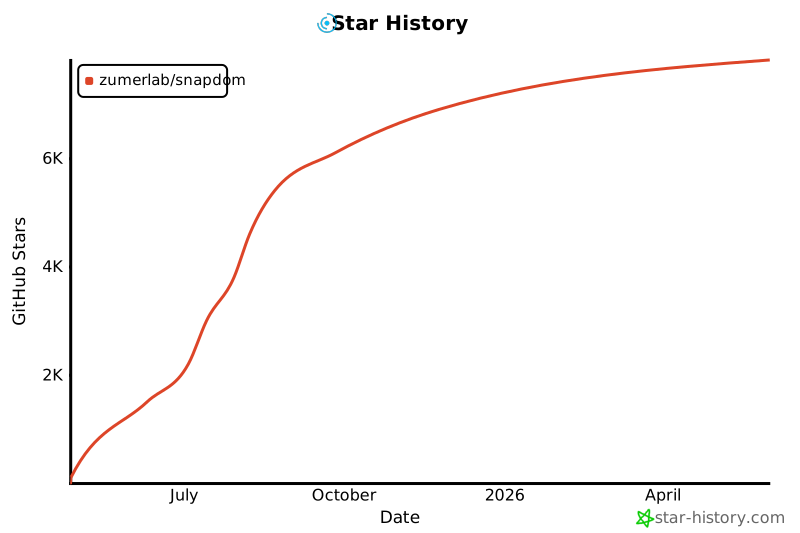](https://www.star-history.com/#zumerlab/snapdom&Date)
## 许可证
MIT © Zumerlab