# HuskarUI
**Repository Path**: MenPenS/HuskarUI
## Basic Information
- **Project Name**: HuskarUI
- **Description**: * 此仓库为 Github 镜像仓库 - 「 HuskarUI」 基于 Qml 的 Ant-d UI 套件
- **Primary Language**: C++
- **License**: MIT
- **Default Branch**: master
- **Homepage**: https://github.com/mengps/HuskarUI
- **GVP Project**: No
## Statistics
- **Stars**: 38
- **Forks**: 20
- **Created**: 2024-12-08
- **Last Updated**: 2025-12-11
## Categories & Tags
**Categories**: desktop-ui
**Tags**: Qt, Qml, Controls, Cpp, UI
## README

# 「 HuskarUI 」 基于 Qml 的现代 UI
Qt Qml 的 Ant 设计组件库
如果你需要 Python 实现 [HuskarUI for PySide6](https://github.com/mengps/PyHuskarUI)
如果你需要 Qt5 实现 [HuskarUI for Qt5](https://github.com/mengps/HuskarUI_Qt5)
![win-badge] ![linux-badge] ![macos-badge] ![android-badge]
[![Issues][issues-open-image]][issues-open-url] [![Issues][issues-close-image]][issues-close-url] [![Release][release-image]][release-url]
[![QQGroup][qqgroup-image]][qqgroup-url]
[English](./README.md) | 中文
[win-badge]: https://img.shields.io/badge/Windows-passing-brightgreen?style=flat-square
[linux-badge]: https://img.shields.io/badge/Linux-passing-brightgreen?style=flat-square
[macos-badge]: https://img.shields.io/badge/MacOS-passing-brightgreen?style=flat-square
[android-badge]: https://img.shields.io/badge/Android-passing-brightgreen?style=flat-square
[issues-open-image]: https://img.shields.io/github/issues/mengps/HuskarUI?label=Issue&style=flat-square
[issues-open-url]: https://github.com/mengps/HuskarUI/issues
[issues-close-image]: https://img.shields.io/github/issues-closed/mengps/HuskarUI?color=brightgreen&label=Issue&style=flat-square
[issues-close-url]: https://github.com/mengps/HuskarUI/issues?q=is%3Aissue%20state%3Aclosed
[release-image]: https://img.shields.io/github/v/release/mengps/HuskarUI?label=Release&style=flat-square
[release-url]: https://github.com/mengps/HuskarUI/releases
[qqgroup-image]: https://img.shields.io/badge/QQGroup-490328047-f74658?style=flat-square
[qqgroup-url]: https://qm.qq.com/q/cMNHn2tWeY
## ✨ 特性
- 📦 一套开箱即用的优质 Qml 组件.
- 🎨 强大的主题定制系统.
- 💻 基于Qml,完全跨平台.
- 🔧 高度灵活的基于委托的组件定制.
## 🗺️ 路线图
开发计划可以在这里看到: [组件路线图](https://github.com/mengps/HuskarUI/discussions/5).
任何人都可以通过 issue/qq群/wx群 进行讨论, 最终有意义的组件/功能将添加到开发计划.
## 🌐 在线 wiki
- [HuskarUI 在线 wiki (AI)](https://deepwiki.com/mengps/HuskarUI)
## 📺 在线演示
- [哔哩哔哩](https://www.bilibili.com/video/BV1jodhYhE8a/?spm_id_from=333.1387.homepage.video_card.click)
## 🗂️ 预编译包
预编译了两个平台的 `Windows / Linux` 程序包和二进制库包.
前往 [Release](https://github.com/mengps/HuskarUI/releases) 中下载.
## 🔨 如何构建
- 克隆
```auto
git clone --recursive https://github.com/mengps/HuskarUI.git
```
- 构建 & 安装
- Windows - Visual Studio
```sh
cd HuskarUI
cmake -DCMAKE_PREFIX_PATH= -G "Visual Studio " -B build -S .
cmake --build build --config Release --target ALL_BUILD INSTALL --parallel
```
- All - Ninja
```sh
cd HuskarUI
cmake -DCMAKE_PREFIX_PATH= -G "Ninja" -B build -S .
cmake --build build --config Release --target all install --parallel
```
> [!IMPORTANT]
> 默认情况下, `INSTALL_HUSKARUI_IN_DEFAULT_LOCATION=ON`:
> - `headers` 将安装在 `[QtDir]/[QtVersion]/[Kit]/include/HuskarUI` 目录中.
> - `*.dll` 将安装在 `[QtDir]/[QtVersion]/[Kit]/bin` 目录中.
> - `*.lib/*.so/*.dylib` 将安装在 `[QtDir]/[QtVersion]/[Kit]/lib` 目录中.
> - `qmlplugin` 将安装在 `[QtDir]/[QtVersion]/[Kit]/qml` 目录中.
>
> 如果您想改变安装目录, 请将 `INSTALL_HUSKARUI_IN_DEFAULT_LOCATION` 设置为 `OFF` 并在 cmake 中设置 `HUSKARUI_INSTALL_DIRECTORY`.
> ```sh
> cmake -DCMAKE_PREFIX_PATH= \
> -DINSTALL_HUSKARUI_IN_DEFAULT_LOCATION=OFF \
> -DHUSKARUI_INSTALL_DIRECTORY= \
> -G "Ninja" -B build -S .
> ```
安装目录结构
```auto
──
├─include
│ └─HuskarUI/*.h
├─bin
│ *.dll
├─lib
│ *.lib/*.so/*.dylib
│ └─cmake/*.cmake
└─qml
└─HuskarUI/Basic
```
- 用法
- 使用 cmake
添加下面的 cmake 命令到您项目的 `CMakeLists.txt` 中
```cmake
find_package(HuskarUI REQUIRED)
target_link_libraries( HuskarUI::Basic)
```
- 直接使用库
- 链接`/lib`.
- 包含 `/include`.
- [可选] 复制 `/bin/HuskarUIBasic.[dll]` 到 `[QtDir]/[QtVersion]/[Kit]/bin`.
- [可选] 复制 `/lib/HuskarUIBasic.[so/dylib]` 到 `[QtDir]/[QtVersion]/[Kit]/bin`.
- 复制 `/qml/HuskarUI` 到 `[QtDir]/[QtVersion]/[Kit]/qml`.
## 📦 上手
- 创建 QtQuick 应用 `QtVersion >= 6.7`
- 添加下面的代码到您的 `main.cpp` 中
```cpp
#include "HuskarUI/husapp.h"
int main(int argc, char *argv[])
{
...
/*! 设置 OpenGL, 可选 */
QQuickWindow::setGraphicsApi(QSGRendererInterface::OpenGL);
QQuickWindow::setDefaultAlphaBuffer(true);
...
QGuiApplication app(argc, argv);
QQmlApplicationEngine engine;
HusApp::initialize(&engine);
...
}
```
- 添加下面的代码到您的 `.qml` 中
```qml
import HuskarUI.Basic
HusWindow {
...
}
```
好了,你现在可以愉快的开始使用 HuskarUI 了。
## 🚩 参考
- Ant-d 组件: https://ant-design.antgroup.com/components/overview-cn
- Ant 设计: https://ant-design.antgroup.com/docs/spec/introduce-cn
## 💓 许可证
使用 `MIT LICENSE`
## 🌇 环境
Windows 11 / Ubuntu 24.04.2, Qt Version >= 6.7
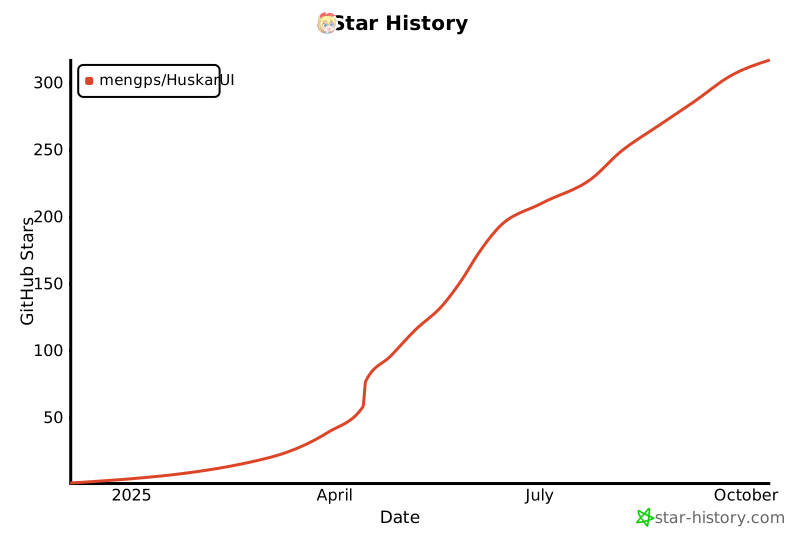
## 🎉 Star 历史
[](https://star-history.com/#mengps/HuskarUI&Date) 

